
Run Python on your Android phone: what works, what doesn't, and what to use today
Yes: PocketCode runs real CPython 3.12 on your phone, no Termux needed. What works, what doesn't, and how it compares with Termux, Pydroid 3 and QPython.
Short answer: yes, you can run Python on an Android phone — PocketCode runs a real CPython 3.12 interpreter on the device itself, with no pip and only the standard library, and it is available on Google Play (free; Pro optional).
Search "run Python on Android" and most answers send you down one of two roads: install a full terminal environment and compile things by hand, or paste your code into a website that runs it on someone else's server. The first is fiddly; the second stops working the moment you lose signal.
PocketCode takes a third road: it runs real Python, directly on your phone,
with nothing to install. Open a .py file, tap Run, and CPython
executes on the device in your hand. This post explains exactly how that works,
what you can build with it, and — just as importantly — where the honest limits
are.
What we know for sure
Everything here comes from PocketCode's own source code, not from marketing:
- The interpreter: CPython 3.12, built for WASI (WebAssembly) and shipped inside the app package as
python.wasm(about 26 MB uncompressed), run by an embedded WebAssembly runtime. It is not a separate download. - How it runs: the editor's Run button handles
.pyand.pywfiles. Your project folder is mounted as/project, and network access is off unless you turn on Allow network in WASM engines in Run with arguments. - Requirements: Android 9 or newer, on a 64-bit device (arm64-v8a or x86_64).
- Editor support: a Python language server (Pyright) is in the editor's one-tap installable list, for completion and diagnostics.
- Packages: the standard library only — see the table below. There is no
pip. - Status: available on Google Play (free; Pro optional).
- What we have not published: benchmarks or a list of tested devices, so this post makes no speed or compatibility claims beyond the above.
Real CPython, running on the device
This isn't a Python-like interpreter or a hosted sandbox. PocketCode bundles CPython 3.12 and runs it on-device: the build is compiled to WebAssembly and executed by an embedded runtime inside the app. There's no remote server doing the work, and nothing to configure — install PocketCode and Python is simply there.
Because execution is local, two things follow that matter on a phone:
- It runs on the device. Your scripts execute on the phone, not on a server — the app only needs a connection to sign in; opening the app with a session already started works offline.
- Your code stays on your device. Nothing is uploaded to a third-party runner to execute.
What you can actually run
You get most of the CPython 3.12 standard library — the batteries Python is famous for:
| You want to… | Use |
|---|---|
| Parse and generate JSON | json |
| Match and transform text | re |
| Do math and stats | math, statistics, random |
| Work with dates and time | datetime, time |
| Structure data | collections, dataclasses, itertools |
| Read and write files | pathlib, csv, io |
Here's a script that uses nothing but the standard library — it runs exactly as-is:
import json, statistics

scores = [88, 92, 79, 95, 88, 73]
summary = {
    "count": len(scores),
    "mean": round(statistics.mean(scores), 1),
    "median": statistics.median(scores),
    "max": max(scores),
}
print(json.dumps(summary, indent=2))
Tap Run and the console prints:
{
  "count": 6,
  "mean": 85.8,
  "median": 88.0,
  "max": 95
}
That covers the vast majority of scripting, automation, algorithm practice, data munging, and learning-to-code work. If you're studying for interviews, following a Python course, prototyping a parser, or scripting a quick transformation on the go, it runs as-is.
The honest limits
We'd rather set expectations than have you hit a wall, so here's the straight version:
- No
pip, no external packages. You can't install third-party libraries at runtime. Anything that isn't in the standard library — including C-extension-backed packages like NumPy or pandas — won't import. This is a scripting and learning environment, not a data-science stack. - Not the whole standard library. Most of it is there —
json,csv,sqlite3,decimal,zlib/bz2,xml.etree.ElementTree,hashlib,pickle,zoneinfo,asyncio,socket/select— butssl,ctypes,lzma,tkinter,turtle,curses,venv,ensurepipandmultiprocessingare not available. - No real threads or subprocesses. Don't expect true parallelism or the ability to launch other processes.
- No internet from a script, by default. The interpreter runs in a
WebAssembly sandbox with network access blocked, so a script can't open a
socket or fetch a URL unless you turn on Allow network in WASM engines in Run with arguments
(and even then there is no
ssl, so no HTTPS). It only sees your project folder, mounted as/project: it reads and writes those files and prints to the console. - Standard-library Python only. If a tutorial's first line is
pip install ..., that part won't apply here. - Interpreter-speed, not native speed. On-device execution is plenty fast for scripts and exercises, but heavy number-crunching will feel slower than a desktop CPython with native optimizations.
Within those lines, it's real Python with no asterisks.
The workflow: open, Run, read the output
Running a script is deliberately boring — which is the point:
- Open or create a
.pyfile in the code editor. - Tap Run. PocketCode routes the file to its on-device Python runner.
- Output streams into the console exactly like any other process —
print(), tracebacks, exit codes and all.
You get the editor's full toolkit around it, too: LSP-backed autocomplete and
inline diagnostics, on-device PEP-8 formatting,
a programming symbol bar so : and [] aren't a scavenger hunt, and multi-cursor
editing — all on the phone.
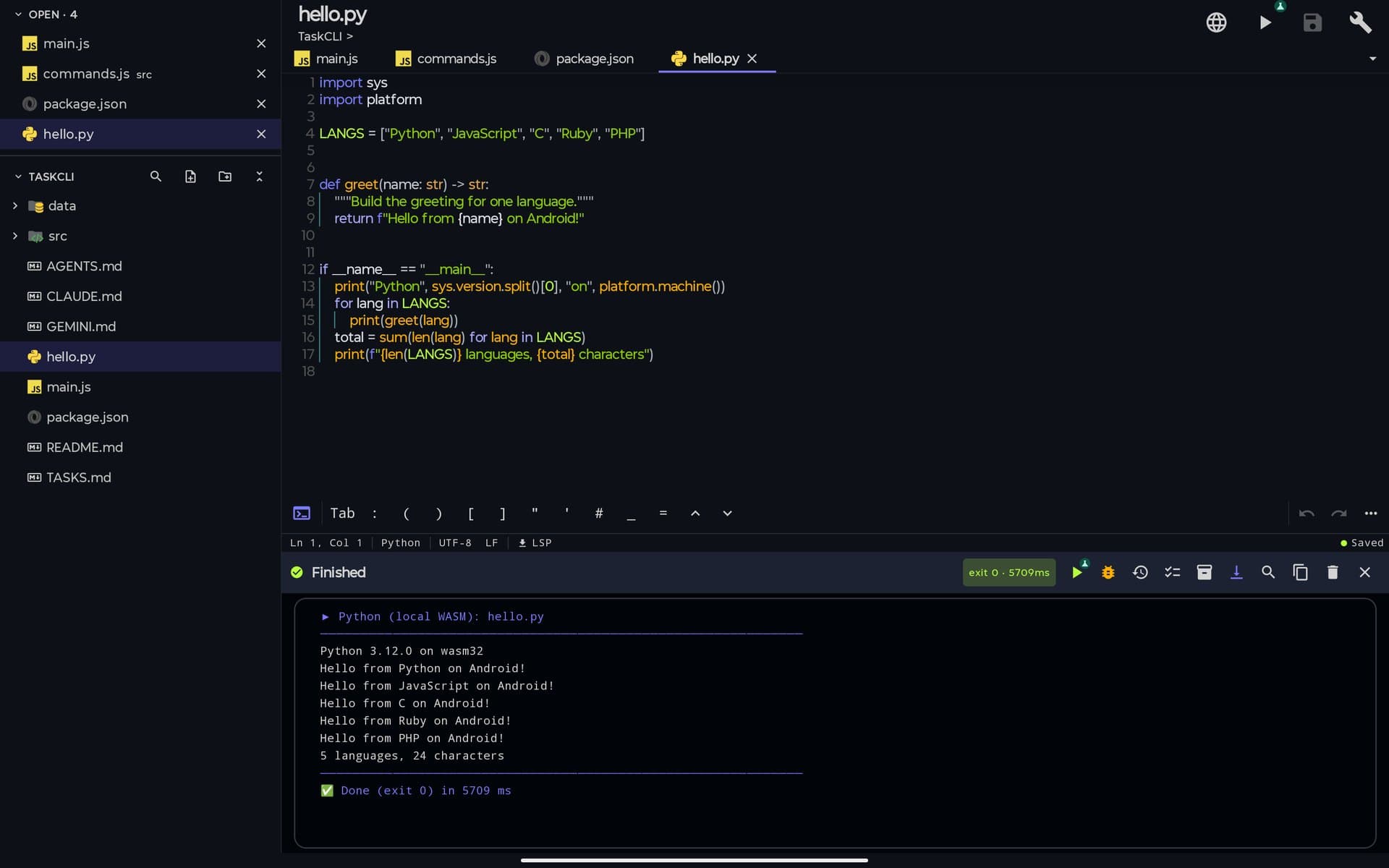
Real screenshot: hello.py run with the Run button on a tablet. CPython 3.12 runs on the device through WASM and prints to the integrated console; the Python language server (Pyright) installs with one tap from the status bar.
One note on scope: Python runs from the editor's Run button. The built-in AI assistant can run a file through the same on-device runner (its
build_run_filetool), and at the default access level it asks before running.
Python is one of many
Python isn't a one-off. The same on-device execution model covers 16 languages and file types in PocketCode — so the phone that runs your Python script can also run a JavaScript file on a real bundled Node.js, a Ruby one-liner, or compile and run C with an on-device compiler, all without a server in the loop. 13 of them come inside the app (JavaScript, TypeScript, C, Python, Ruby, PHP, Java through a limited interpreter, Kotlin, Shell, SQL, plus HTML, Markdown and JSON checks and previews); Lua, Go and Rust-style scripts arrive as optional packs. The full lineup has the details, including what doesn't run yet.
Your options today
Here is an honest comparison of what you can use right now. The competitor columns are a general description; check each listing for its current Python version and pricing before you install.
| Termux | Pydroid 3 | QPython | PocketCode | |
|---|---|---|---|---|
| What it is | Terminal emulator with its own package manager | Python IDE app | Python app with script editor and console | Android IDE with a built-in Python runner |
| Python | Installed from Termux's package repository (pkg install python) | Bundled; version depends on the release | Bundled; version depends on the release | CPython 3.12 on WebAssembly, bundled |
| pip / packages | pip works; native packages depend on what Termux provides or you compile | pip plus a custom repository of prebuilt wheels | Its own package index (QPYPI) | None: standard library only |
| Editor / LSP | No graphical editor (vim, nano and similar) | Built-in editor; some features are Premium | Built-in editor | Code editor with LSP; Pyright installs in one tap |
| Terminal | Yes, that is the whole app | Includes a terminal | Console | Built-in terminal, separate from the Python runner |
| Cost / ads | Free, open source | Free with ads; Premium upgrade | Free with ads or paid tiers (check the listing) | A Free plan exists; paid plan details are on the pricing page |
| Status | Available now (see the Termux wiki for the recommended source) | Available now on Google Play | Available now on Google Play | Available on Google Play (free; Pro optional) |
How to choose:
- You need
pip installor NumPy today: Termux or Pydroid 3. - You want a ready-to-go editor and are happy with the standard library: Pydroid 3 or PocketCode.
- You want one app for Python plus JavaScript, C, databases, Git and an SSH terminal: that is what PocketCode is built for, and you can install it from Google Play.
- You want to package a Python app as an APK: none of these tools do that. Look at python-for-android, Briefcase or Chaquopy instead.
Sources and further reading
- The Python 3.12 standard library reference, to check which modules a script can import.
- Using Python on Android, the official CPython documentation for the Android platform.
- The Termux wiki, for installing Python and packages in Termux.
- Pydroid 3 on Google Play, for its current version and pricing.
A phone in your pocket is a genuinely capable Python machine — private and instant. Not for training a neural net, but absolutely for learning the language, practicing algorithms, and scripting real work while you're away from a desk.
PocketCode is available on Google Play. Get PocketCode and run Python on your own device.
Frequently asked questions
Can you run Python on Android?
Yes. PocketCode runs a real CPython 3.12 interpreter directly on the phone — open a .py file, tap Run, and it executes on-device, with no server involved.
Do you need Termux to run Python on Android?
No. The interpreter is built into PocketCode. There is nothing to install or compile — it works the moment you open the app.
Does it run Python on the device?
The interpreter lives on your device, so your scripts run on the phone itself. The app needs a connection to sign in; opening the app with a session already started works offline; after that, running Python is local.
Is it real Python?
Yes — real CPython 3.12 with most of the standard library, compiled to WebAssembly and executed by an embedded runtime. It is not a Python-like look-alike.
Can you use pip or install packages like NumPy?
No. You get most of the standard library, but there is no pip and no C-extension packages such as NumPy or pandas. It is a scripting and learning environment, not a data-science stack.
Can a Python script access the internet?
Not by default. The interpreter runs in a WebAssembly sandbox with network access blocked, so scripts cannot open sockets or fetch URLs unless you turn on *Allow network in WASM engines* in Run with arguments. Even then there is no ssl module, so HTTPS is not available.
Can I download PocketCode and run Python today?
Yes. PocketCode is available on Google Play and is free to download (Pro is an optional in-app subscription). It needs Android 9 or newer and a 64-bit device. Termux and Pydroid 3 are the other options you can install now — the comparison table on this page shows how they differ.
Code Editor