
Postman for Android? The alternatives that actually work on a phone
Postman has no Android app. What works on a phone instead: Postman's web app, Hoppscotch, curl in Termux, and an API tester that imports Postman collections.
Short answer: Postman doesn't make an Android app. On a phone you can open Postman's web app in the browser (cramped, and no localhost), use Hoppscotch, run curl or HTTPie in Termux, or use a native API client. PocketCode's API tester is one of those, and it imports Postman collections.
I build PocketCode, so weigh my opinion of it accordingly. The rest of the options are described by what they do and what they don't.
Why there's no Postman on Android
Postman's documentation lists it as a desktop app for macOS, Windows and Linux, plus a web app. Apps on Google Play with "Postman" in the name are independent projects, not Postman's. So "Postman for Android" really means "something that does the same job on a phone".
The options
Postman's web app in the phone's browser
It works for a quick look at your workspaces, and your collections are already there. The downsides on a phone:
- The layout is made for a desktop screen.
- Requests to
localhostor your local network need Postman's desktop agent, which doesn't exist for Android.
Hoppscotch
Hoppscotch is an open-source API client that runs in the browser and can be installed as a PWA. It covers REST, GraphQL, WebSocket, SSE and MQTT, imports cURL and generates code snippets. On a phone it's a web page, so the same desktop-layout and browser limits apply.
curl or HTTPie in Termux
If you're comfortable in a terminal, pkg install curl (or httpie) in Termux gives you the real tools with nothing in between. No collections, no response viewer, but nothing is faster for a single request once you know the flags.
A native API tester: PocketCode
PocketCode is an Android IDE, and one of its tools is an API tester built for the phone. Here's what it does, checked against the app's source code:
- Six protocols: REST, GraphQL (with schema introspection), WebSocket, Server-Sent Events, Socket.IO and MQTT. A gRPC panel exists in the code, but it's hidden in the current version until it works reliably on Android.
- Imports Postman, Insomnia, OpenAPI and HAR files, and cURL commands, and exports any request as cURL.
- Environments with
{{variable}}interpolation in the URL, query params, headers and body. - Auth: ten types, including Bearer, Basic, API key and OAuth 2.0 (with OAuth you paste the authorization code back by hand; the app can't catch the redirect).
- Scripts: pre-request and test scripts in a sandboxed JavaScript engine, with
pm.test,pm.expectandpm.environment.get/set. There's nopm.sendRequest,pm.variablesorsetNextRequest, so heavy Postman scripts won't run unchanged. - Response viewer with a collapsible JSON tree, headers, cookies and test results.
- Keyboard shortcuts on tablets in landscape:
Ctrl+Enterto send,Ctrl+Tnew tab,Ctrl+Wclose tab andCtrl+Ssave.
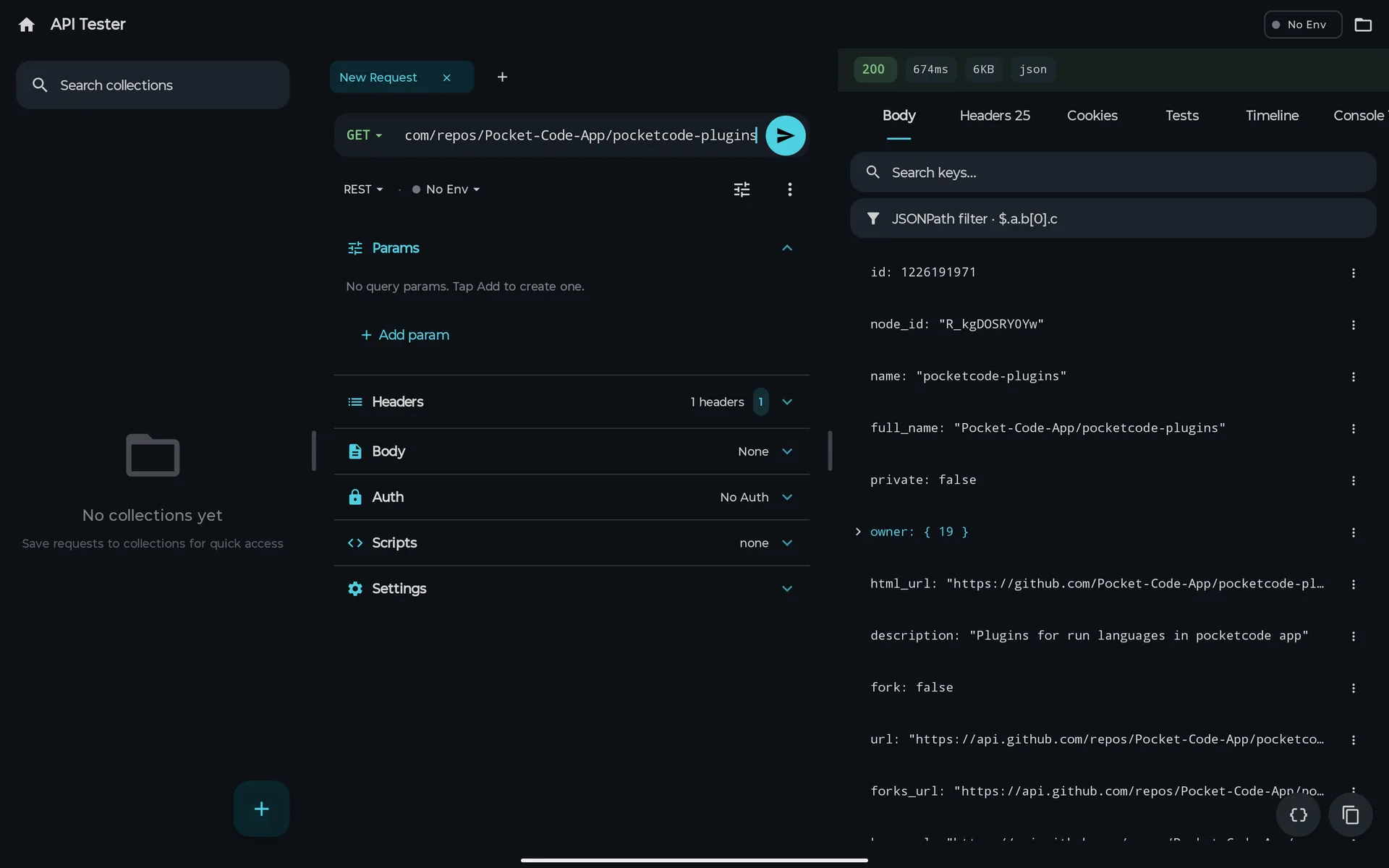
Here's a real screenshot of the API tester on a tablet.
What the Free plan includes and what needs Pro:
- Free: every protocol, one collection, one environment and the last ten requests in history.
- Pro: unlimited collections and environments, the collection runner, the mock server, load tests and syncing collections between devices.
Comparison
| Postman web | Hoppscotch | curl / HTTPie in Termux | PocketCode | |
|---|---|---|---|---|
| Runs as | Web page | Web page or PWA | Terminal commands | Native Android app |
| Made for a phone screen | No | No | Terminal only | Yes |
| REST and GraphQL | Yes | Yes | Yes (by hand) | Yes |
| WebSocket, SSE, MQTT | Yes | Yes | Depends on the tool | Yes, plus Socket.IO |
| Import Postman collections | Already in Postman | Yes | No | Yes |
| Requests to localhost | Needs the desktop agent | Browser limits | Yes | Yes |
| Cost | Free tier and paid plans | Free, open source | Free | Free plan; Pro is optional |
How to choose
- You already live in Postman and just need to check something: the Postman web app.
- You want something open source in the browser: Hoppscotch.
- You know curl and only need one-off requests: Termux.
- You want collections, environments and a JSON viewer that fit a phone, and you'd like to bring your Postman collections with you: PocketCode.
Sources
- Get Postman, Postman's documentation on its desktop and web apps.
- Hoppscotch documentation, for its features and the PWA.
- Termux wiki, for installing packages such as curl.
PocketCode is free to download on Google Play. Get PocketCode, import a Postman collection and try a request from your phone. The API tester page has more screenshots.
Frequently asked questions
Is there a Postman app for Android?
No. Postman's own documentation describes it as a desktop and web app, with downloads for macOS, Windows and Linux. Android apps with Postman in the name are unofficial.
Can I use Postman in the phone's browser?
You can open the Postman web app in a mobile browser, but it's built for a desktop screen. Requests to localhost or a private network need Postman's desktop agent, which doesn't run on Android.
Can I import my Postman collections on Android?
In PocketCode, yes: its API tester imports Postman, Insomnia, OpenAPI and HAR files and cURL commands. On the Free plan you can keep one collection; Pro removes the limit.
Do Postman test scripts work in PocketCode?
Part of them. PocketCode runs pre-request and test scripts in a sandboxed JavaScript engine with pm.test, pm.expect and pm.environment.get/set. It doesn't have pm.sendRequest, pm.variables or setNextRequest, so complex Postman scripts may need changes.
API Tester