
An IDE for Android tablets: what a bigger screen changes, and what to use
An Android tablet with a keyboard can be a real coding machine. What to look for in a tablet IDE, the options, and how PocketCode uses the extra space.
Short answer: an Android tablet with a Bluetooth keyboard is enough for scripts, web projects, back-end work and server administration. You just need an IDE that uses the extra width to keep the file tree, code and terminal visible at once. Termux with code-server, Acode and PocketCode cover the main options; this post explains what each does on a tablet.
I build PocketCode, so read what I say about it with that in mind.
What a tablet changes
On a phone you switch between screens all the time. On a tablet you can keep things side by side:
- A docked file tree next to the code, instead of a drawer you open and close.
- A terminal with its tools visible, or two terminals split on screen.
- Request and response next to each other when you test an API.
- A physical keyboard with shortcuts, which turns typing from slow to normal.
You want an IDE that actually changes its layout on a wide screen. A phone layout stretched to 11 inches is no better than the phone.
The options
Termux with code-server
Termux plus code-server gives you VS Code in the tablet's browser, which on a large screen is very usable. You get Termux's packages for your toolchain. Setup takes time, code-server only installs web extensions on Android unless you load .vsix files by hand, and it runs in a browser tab rather than an app.
Acode
A light, open-source editor (MIT) with plugins, GitHub and SFTP support and an Alpine Linux terminal with apk. It works well on a tablet for editing and running things from its terminal. Free with ads, or paid.
GitHub Codespaces in the browser
Full VS Code connected to a cloud machine, which is comfortable on a big screen with a keyboard. Personal accounts on GitHub's Free plan include 120 core hours a month. It needs a connection the whole time.
PocketCode
PocketCode is an IDE for Android phones and tablets. On a tablet, the app adapts its layout:
- Navigation moves to a side rail in landscape.
- The editor docks the file tree on screens 840 dp wide and up, and you can resize it between 200 dp and 45% of the width. On narrower screens it's a drawer.
- The terminal docks its tools panel (snippets, hosts, SFTP and more) on the right when there's room, and can split into two sessions (split view is part of Pro).
- The API tester has a landscape tablet layout with request and response side by side and shortcuts:
Ctrl+Enterto send,Ctrl+Tnew tab,Ctrl+Wclose tab andCtrl+Ssave. - Keyboard support includes keymap presets for VS Code, IntelliJ IDEA, Sublime Text and Atom, plus a command palette.
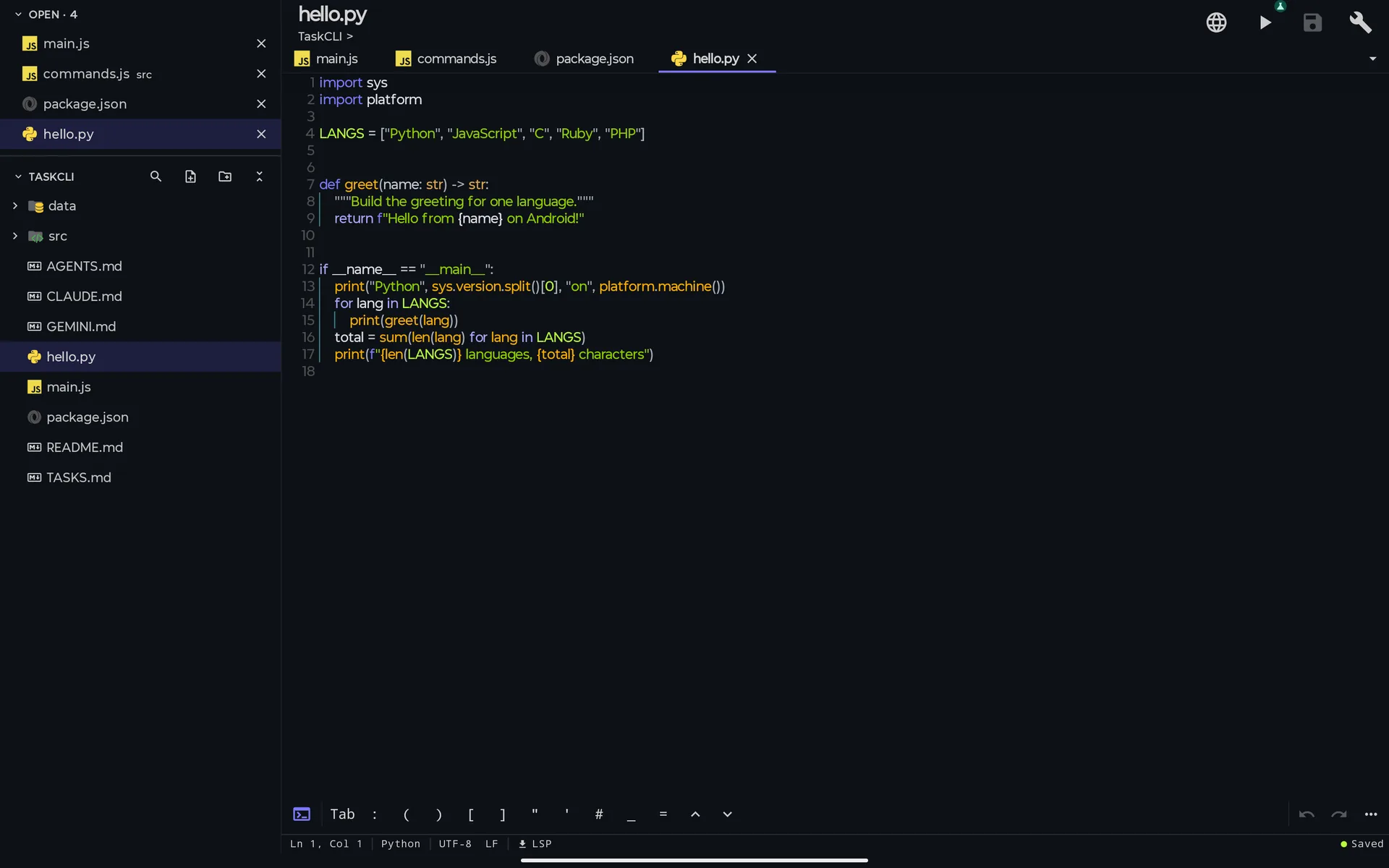
A real screenshot of the editor on a tablet, with the file tree docked.
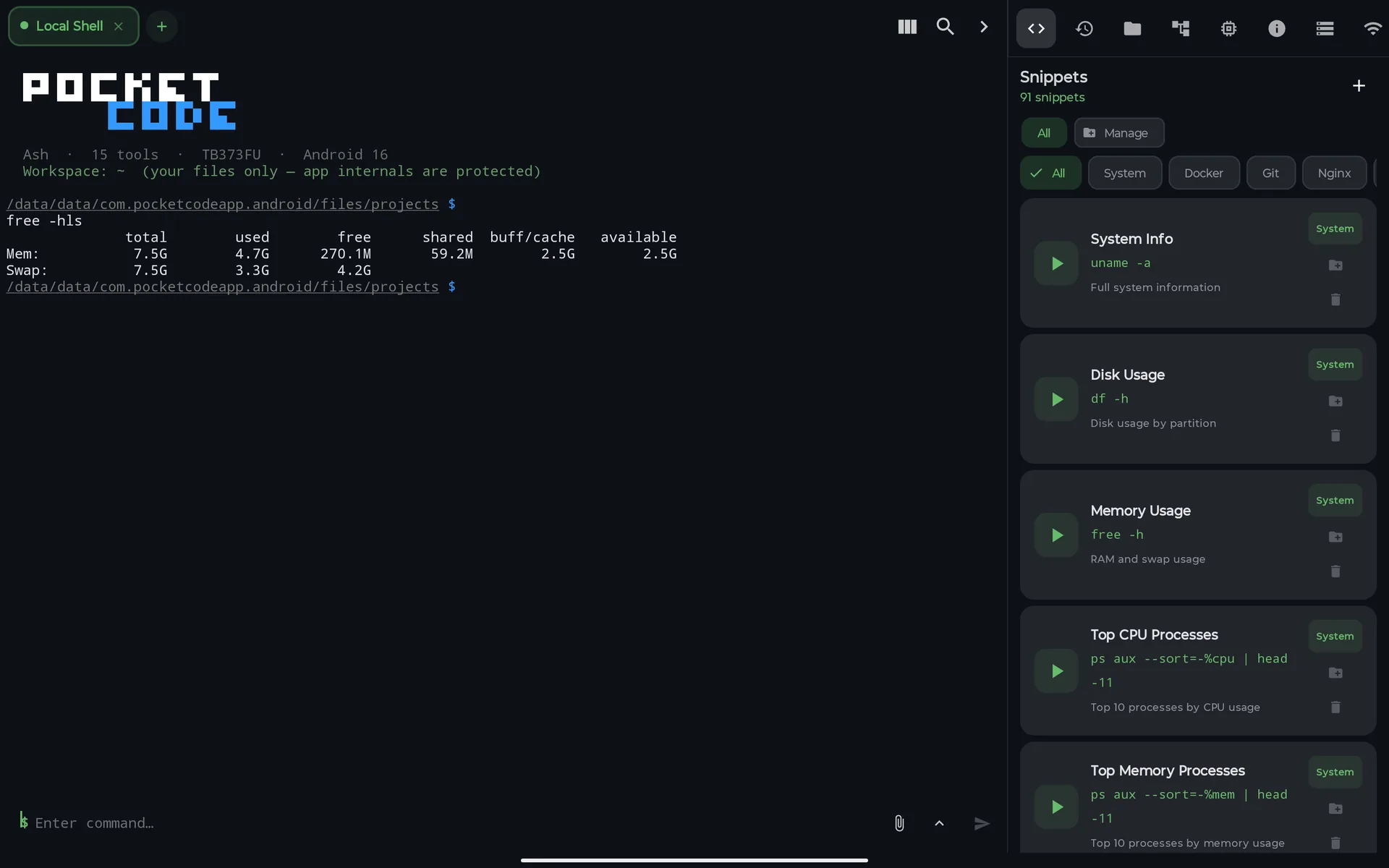
The terminal on the same tablet, with the tools panel docked.
What it doesn't do: it doesn't compile Android apps, its shell has no package manager, and it needs Android 9 or later on a 64-bit device.
What about building Android apps on the tablet?
People ask about this the most. The honest answer is that it's still limited. AndroidIDE, the best-known project for building Android apps on the device, was archived in 2024, and its authors point to a successor called Code on the Go. Most tablet IDEs, PocketCode included, are for scripts, web, back-end and servers.
Comparison
| Termux + code-server | Acode | Codespaces | PocketCode | |
|---|---|---|---|---|
| Layout for wide screens | VS Code in the browser | Editor and terminal | VS Code in the browser | Docked file tree, terminal tools and API tester layout |
| Keyboard shortcuts | VS Code's | Yes | VS Code's | VS Code, IntelliJ, Sublime and Atom presets |
| Runs code | On the tablet | Through its terminal | In the cloud | On the tablet |
| Works offline | Yes | Yes | No | Yes, once signed in |
| Setup | Several steps | Install the app | Browser and GitHub account | Install the app |
| Cost | Free | Free with ads, or paid | 120 core hours/month free | Free plan; Pro is optional |
How to choose
- You want VS Code and its ecosystem, offline: Termux with code-server.
- You want VS Code and you're always online: Codespaces.
- You want something light with a package manager in the terminal: Acode.
- You want an IDE that rearranges itself for the tablet, with Git, SSH, databases and an API tester in the same app: PocketCode.
Sources
- code-server on Termux, for the install steps and the extension limitation.
- GitHub Codespaces billing, for the free core hours.
- Acode on GitHub, for its licence and features.
- AndroidIDE on GitHub, archived, with the note about the project ending.
PocketCode is free to download on Google Play. Get PocketCode and try it on your tablet. The code editor page has more tablet screenshots.
Frequently asked questions
Can you program on an Android tablet?
Yes. With a Bluetooth keyboard, an Android tablet runs editors, terminals and IDEs that execute code on the device. The bigger screen makes it practical to see a file tree, your code and a terminal at the same time.
What is the best IDE for an Android tablet?
It depends on the work. Termux with code-server gives you VS Code in the browser, Acode is a light editor with a terminal, and PocketCode is an IDE with a docked file tree, terminal, Git, databases and an API tester that adapts its layout to tablets.
Do keyboard shortcuts work on an Android tablet?
In PocketCode, yes. It has keymap presets for VS Code, IntelliJ IDEA, Sublime Text and Atom, a command palette, and shortcuts in the API tester such as Ctrl+Enter to send a request.
Can I build Android apps on an Android tablet?
Only in a limited way. AndroidIDE, the best-known project for that, was archived in 2024. Most tablet IDEs, PocketCode included, are for scripts, web and back-end work, not for compiling Android apps.
Code Editor