
Workflows
Free — the whole engineA workflow is a trigger and a sequence of steps that run over a shared context. It all happens on the device: there is no server to rent and nothing to keep alive in the cloud. Steps branch, loop and call each other, they reference each other's output through expressions, and they react to failure with retry, timeouts and a failure branch.
Four ways to make one
The module opens on a welcome screen. Whichever path you take, what you end up with is the same editable workflow.
Templates
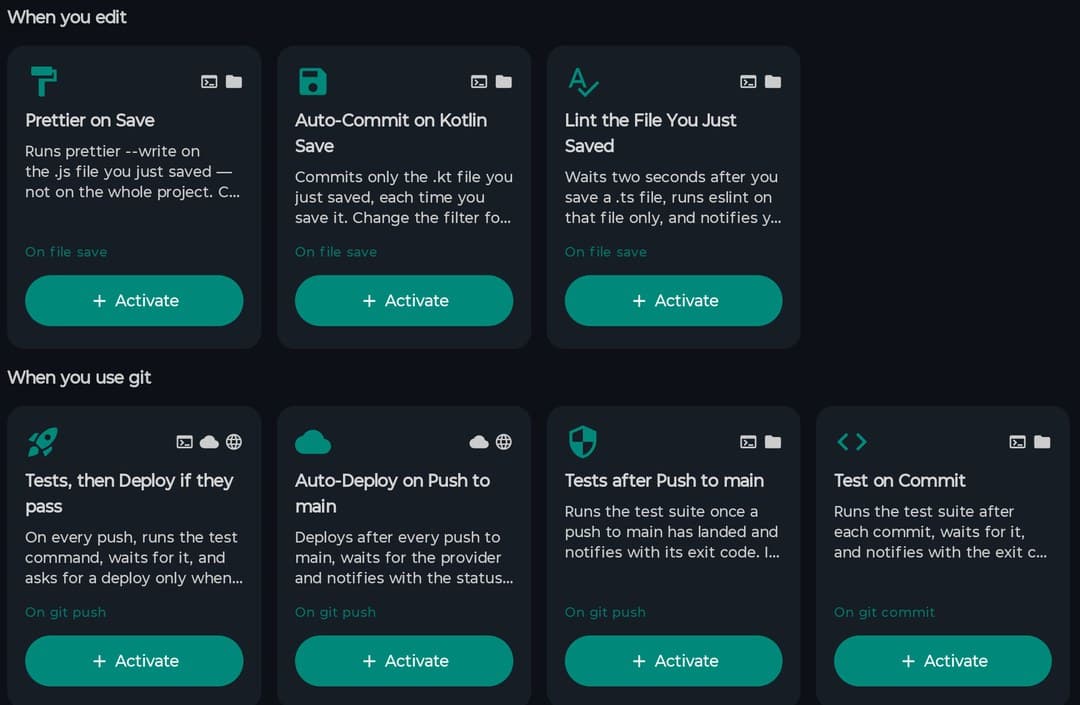
17 built-in templates in four families. Tap Activate and you get an editable copy with a fresh id — nothing is shared with the original.
Describe it to the AI
Write a sentence. The model's answer is repaired where it can be, run through the linter, dry-run, and the result is shown to you before anything is saved.
The editor
A step tree with nested blocks, a searchable action palette, undo/redo, copy-paste of steps and a problems panel. On a tablet the step config opens as a side panel instead of a sheet.
Import a file
Someone shares a .pcwf.json and you open it. It arrives disabled and with a new id, so nothing runs until you have read it.
Triggers (25)
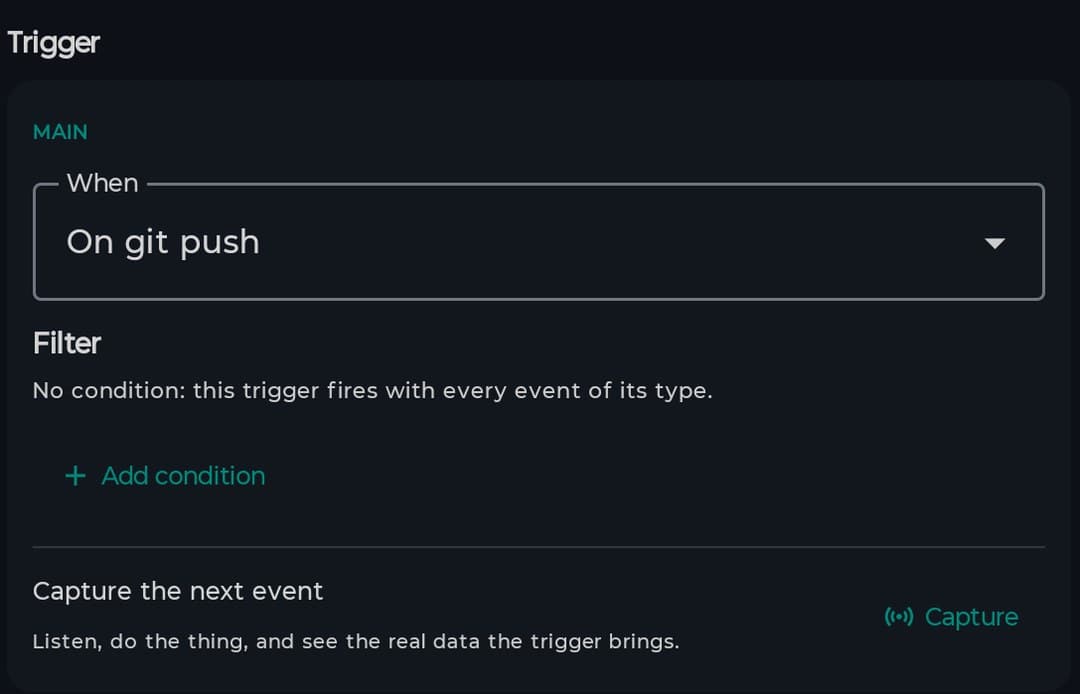
A workflow has one main trigger and as many extra ones as you want, each with its own filter. The filter is typed: every trigger declares its fields, and you compare field against value with operators — equals, contains, starts with, matches, path globs. It is not a substring search over the event's text.
| Git | Git push · Git commit |
| Files | File saved · File created · File deleted · File renamed |
| Project and build | Project opened · Project closed · Build finished · Run finished · Terminal command finished |
| Deploy and data | Deployment completed · Deployment failed · Database query executed |
| Other modules | API Tester response · Design exported · AI agent touched a file · AI agent finished a turn |
| From the phone itself | Shortcut · Quick Settings tile · Shared text · Shared file · App foregrounded |
| Chaining and manual | Error detected (another workflow failed) · Manual or scheduled |
Not every type has something emitting it yet. Rather than hide those, the editor's problems panel warns you when a workflow uses a trigger that would never fire today — a trigger that exists and cannot be used is worse if nobody says so. There is also a «capture the next event» button: you do the thing, and the editor shows you the real payload the trigger carries so you can write the filter against something real.
Actions (15)
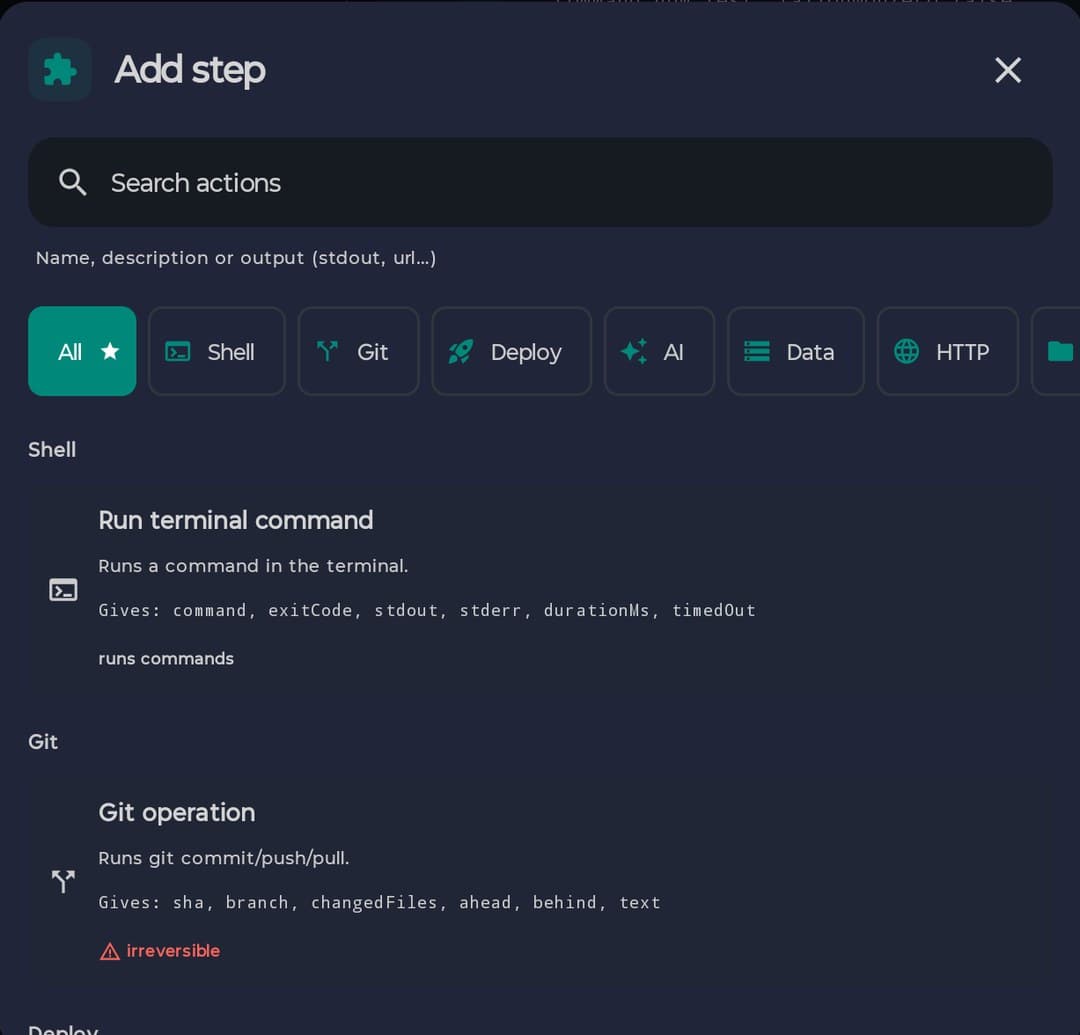
All fifteen are wired to something that really runs, and a test goes red naming any type that loses its implementation. A type with nothing behind it fails loudly instead of quietly reporting success — that used to be possible and is not any more.
| Action | What it does | Outputs |
|---|---|---|
| Run terminal command | Runs a command in the terminal | command · exitCode · stdout · stderr · durationMs · timedOut |
| HTTP request | Calls an endpoint; the body is parsed as JSON when it is JSON | status · body · json · headers · durationMs |
| Git operation | commit, push or pull | sha · branch · changedFiles · ahead · behind · text |
| Deploy | Triggers a deploy on the connected provider | status · url · provider · projectName · logsTail · reason |
| Database query | Runs a query against the active database | rows · rowCount · columns |
| Database backup | Backs up the active database | path · sizeBytes |
| Read file | Reads a file from the project | content · sizeBytes · path |
| Write file | Writes or appends to a file in the project | path · bytesWritten · created |
| File exists | Checks whether a path exists | exists · isDirectory · sizeBytes |
| Open file | Opens a file in the editor, optionally at a line | path · line |
| AI analyze | Sends code or text to the assistant and captures the answer | text · model · tokens |
| AI generate | Generates new code from a prompt | text · model · tokens |
| Transform | Reshapes a value with the expression filters — no side effects | value |
| Set variable | Puts a value into the run context for later steps | name · value |
| Notification | Shows a notification with title and message | shown |
Whether a step is destructive is worked out with its parameters in hand, not from its type: git status is not git push, and creating a new file is not overwriting one. Labelling the whole type destructive would mean confirming a status, and asking for confirmation on everything teaches people to accept without reading.
Branches, loops and sub-workflows
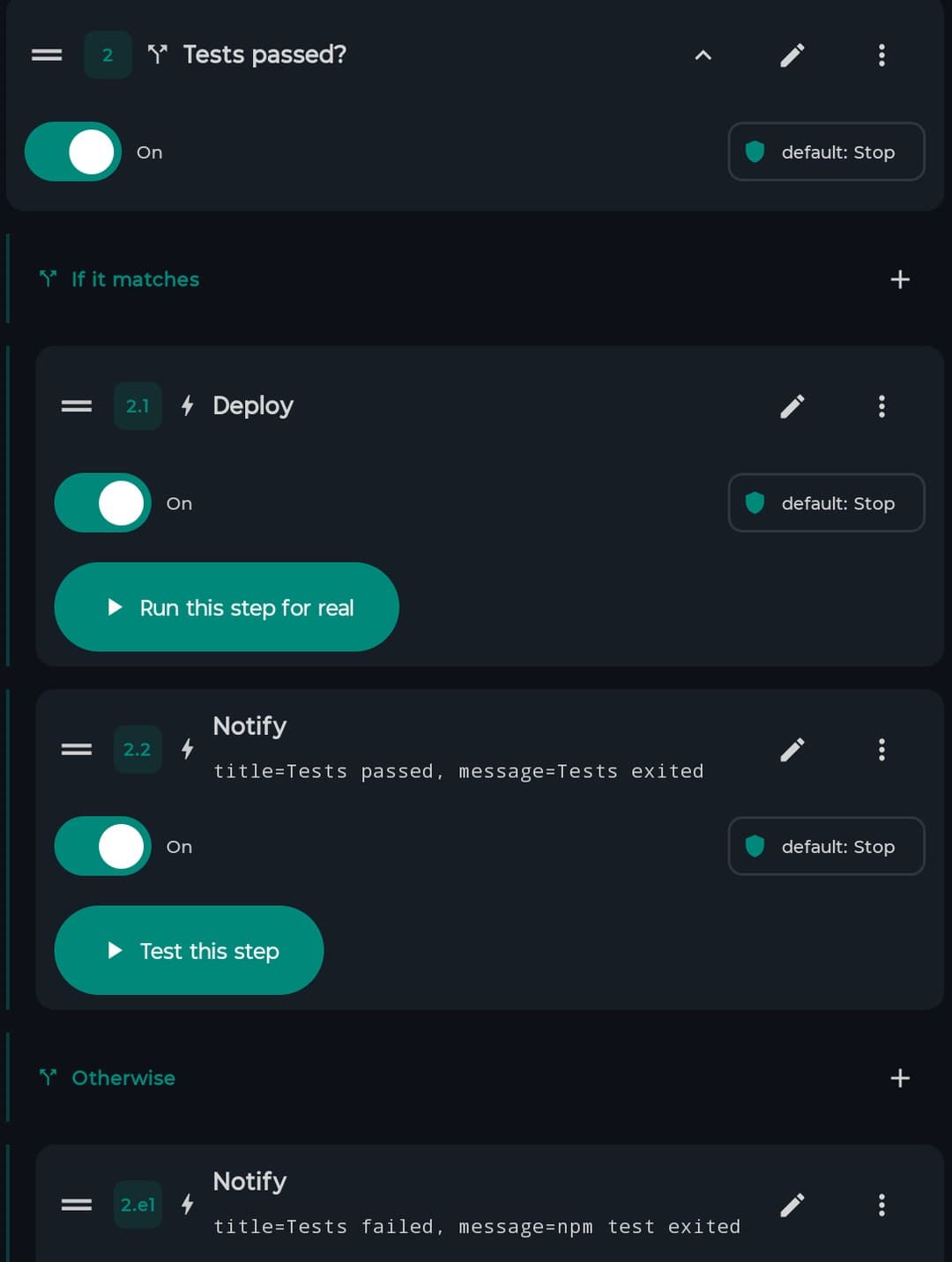
Seven kinds of step, of which six are control flow. Branches nest inside branches, so what you build is a tree, not a straight line.
If / else
Two branches. The condition is a tree, not a single slot: And, Or and Not nest, so «tests passed and the branch is main» is one condition, not two workflows.
Parallel
N branches at once, joined one of three ways: when all finish, with the first that finishes, or with the first that finishes well. The last two cancel the losing branches so they stop firing side effects.
For each
Iterates a list with a per-item alias, a safety cap on iterations, and an optional number of iterations to run at once.
Try / on failure
If anything in the first block fails, the second runs with the error message bound to a variable you name.
Sub-workflow
Runs another workflow inside this run, with its own inputs. The child inherits the intersection of the permissions — it cannot open what the parent closed.
Wait
Pauses for a time — or until an event happens, with the time as the cap. «Wait for the deploy to finish» rather than «wait two minutes and hope».
A condition on any step
Every step carries an optional condition of its own: if it is false the step is skipped, without wrapping it in a whole if / else.
Passing data between steps
Any field takes a literal or an expression in double braces. The editor offers a picker, so you do not have to remember step ids.
| Expression | Resolves to |
|---|---|
| {{var.name}} | A declared input or a value a step set |
| {{step.<id>.status}} | SUCCESS, FAILURE, SKIPPED, TIMED_OUT |
| {{step.<id>.output}} | The whole output map |
| {{step.<id>.output.json.items[0].name}} | A field of the output, navigating inside JSON |
| {{step.<id>.error}} | The step's error message |
| {{item.<alias>}} | The element of the live iteration |
| {{trigger.<field>}} | The typed payload of the event that fired it |
| {{secret.NAME}} | A stored secret. Terminal — you cannot navigate inside one |
Chainable filters
lines · first · last · trim · upper · lower · length · json · default:"x" · split:"," · join · date:"HH:mm" · replace:a:b
So the first line of a command's output is {{step.sh.output.stdout | lines | first | trim}}.
When something goes wrong
Reliability is set per step, and the workflow sets the defaults the steps inherit.
Retry
Number of attempts, with a fixed, linear or exponential wait and a cap on that wait
Timeout
Cancels the step and marks it TIMED_OUT. A timeout is not retried — it comes back as it is
On failure
Stop the run or carry on. Carrying on does not tint the run: the step stays red and the run comes out green
Off
A disabled step is skipped without running. It is what you want while debugging, instead of deleting it and typing it again
And for the whole workflow
Run cap
A time limit for the whole run, not just one step
Concurrency
What to do when a trigger arrives with a run already in flight: skip it, queue it, or cancel the previous one
Default on failure
The value steps inherit when they do not set their own
Retention
How much history to keep: 100 runs and 30 days by default, anywhere from 1 to 1,000 runs and 1 to 365 days
Result step
Which step's output is the workflow's answer when the AI agent calls it
Strict expressions
Off by default, so a reference to a branch that did not run gives an empty string instead of felling the run. On, it is an error with a reason
There is also a cap across the whole app: eight runs at a time. Beyond that they queue, and a run that is turned away or skipped is written to the history as cancelled, saying which of the two caps it was. It is not silent.
Scheduling — cron on your phone
Any workflow can carry one or more schedules: an interval, or a five-field cron expression with wildcards, lists, ranges and steps. As you type, the app shows the next fire time or tells you the expression is wrong. Schedules survive the app closing and are queued again on launch.
Time zones and daylight saving
Each schedule stores its own zone, and the awkward days are resolved and tested: in spring, at the hour that does not exist, it fires on the jump; in autumn, at the hour that happens twice, it fires once.
Missed runs
You choose: skip whatever fell while the device was off, or catch up once when it comes back. Once — not the forty-eight of a long weekend.
Device conditions
Any network, Wi-Fi only or none; only while charging; not on low battery; only while the device is idle. A condition delays the run, it does not cancel it — and the screen says so.
The fifteen-minute floor
Android does not run background work more often than every fifteen minutes. An interval below that is raised and the app tells you the exact number. A cron below it is nobody's to raise, so the only true thing to say is that there is no guarantee — and that is what the screen says, instead of a number that would be made up.
The editor
A step tree with undo and redo, keyboard shortcuts, copy and paste of steps, and drag to reorder. Its problems panel runs 34 rules across structure, parameters, expressions, triggers, loops, reliability, security, sub-workflows and permissions. Only errors block saving; warnings do not — someone who closes a workflow's network usually does it before removing the step that used it, and blocking there would stop them finishing.
Testing one step on its own
Rather than running the whole workflow — with its deploys and its notifications — every time you tweak a parameter, you can run a single step with the pinned data as its context. A step whose implementation says it cannot be simulated is not simulated: the button then says «run this step for real» and asks first. A button that says «fine» without having run anything is worse than no button.
History and activity
Every run is written down whole, with each step's result, how long it took, how many attempts it needed and its error if it had one. It survives crashes and the app closing.
- •An Activity tab across every workflow, filtered by status, by date, by workflow and by the text of the error
- •Per-run detail: step by step, with the output in monospace and the reason it stopped
- •The live log is batched into 100 ms windows before it reaches the screen — a git clone with its progress bar emits hundreds of lines a second
- •Retention is yours to set: 100 runs and 30 days by default
Permissions and secrets
What a workflow is allowed to do
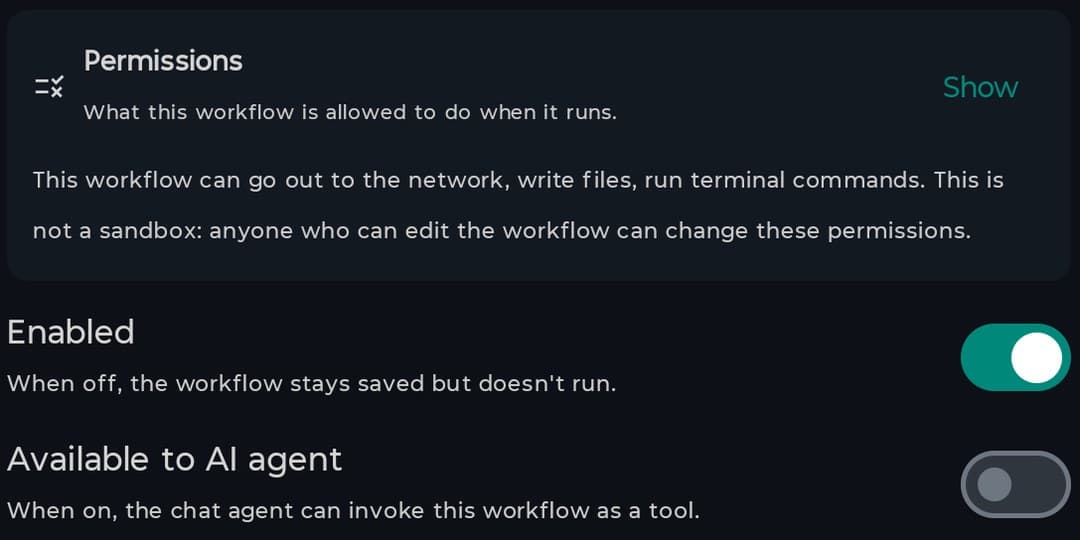
Per workflow: go out to the network, write files, run commands, and a list of domains it may reach. The implementations check before they touch anything, and a refusal says which permission it was, what was about to run and where to change it.
It is not a sandbox, and the screen says so: anyone who can edit the workflow can open the belt. It protects against carelessness — a workflow you opened to the AI, one someone else sent you, or the curl somebody pasted «just to try» and left there.
Secrets
An encrypted store, per account. You reference a secret as {{secret.NAME}} and its value is never shown again, not even on its own screen.
- • They are only resolved in a real run — a dry run does not take them out of the store
- • The masking covers every stored value, not only the ones a step read: if you pasted your token by hand into a command, it is masked too
- • And it happens before writing to the database, not when drawing the screen — masking at paint time would be too late, the value would already be in the file and in any backup
The domain allowlist only reaches HTTP steps: an AI, deploy or git step goes to whatever service it has configured, and the screen says so in those words. The host name is compared, not the address it resolves to, so it is not protection against SSRF. Separately, every file path is confined to the project root.
What the AI can do here
Write one from a sentence, or change one you have
The answer is repaired where it can be, checked by the linter and dry-run, and shown to you before anything is saved. Changing an existing one merges the answer on top, keeping its id, its switch and its date, and shows you the diff. If you have no model configured there is a local fallback — which is the only thing that works for someone who has not put in a key yet.
Workflows as tools for the agent
Tick «available to AI agent» on a workflow and the chat can call it. Six tools in all: three that read (list, get, runs) and three that write (create, update, run) and go through the agent's confirmation gate.
The document sent to the model carries no secret parameter values — they are replaced by a marker.
Templates (17)
A test is the templates' linter: it checks that every trigger has something emitting it, that every action is wired, that every parameter key is declared, that every expression points at something real, and that a dry run of each template finishes without leaving the run in failure. A template that does not work is not shipped.
Classic · 8
Prettier on save · Auto-commit on Kotlin save · Lint the file you just saved · Tests then deploy if they pass · Auto-deploy on push to main · Tests after push to main · Test on commit · DB backup after deploy
Data flow · 3
HTTP health check · Three endpoints in parallel · Release notes from the commit log
Control flow · 3
Deploy or tell me why not · Test every module you touched · Branch protect
From the phone · 3
Share a link straight into the project · Nightly backup · Tests on the branch you are on
Sharing one
A workflow travels as a .pcwf.json file. What does not travel: the run history, the pinned outputs, the schedules and the on/off switch. What arrives is disabled and has a new id.
Parameter values marked secret are emptied before the file is written — and listed, so whoever opens it knows what they have to fill in. A {{secret.NAME}} reference does travel: it is a name, not the secret, and emptying it would break the workflow beyond repair. A file that is not ours, a damaged one and one written by a newer version give three different messages, because they are three different things and only one has a way out.
What costs money
The engine is free, with no asterisks
The 25 triggers, the 15 actions, branches, loops, sub-workflows, cron scheduling, permissions, secrets, the whole history, exporting, the templates, and exposing a workflow as a tool for the AI agent — all of it is on the free plan.
Pro: asking the AI to write or change one
That is the one paid thing, and the limit lives in the chat, not here. Letting the agent run a workflow you already marked as available is free — that tool is the only thing that makes the tick mean anything. History and export are free too: charging for them would be taking away something people already have, and export is the only way to get your work out of the app.
What is not there
Worth knowing before you plan around it.
| Webhook trigger | Out of scope: it needs a backend, push and a secrets model that reaches the server |
| Exact alarms | The floor is fifteen minutes and the app says so, rather than asking you for another permission |
| Workflows in the Marketplace | Neither installing nor publishing. Sharing a workflow today means sharing the file |
| Time zone picker | Every schedule is stored with a zone and handles daylight saving, but new ones take the device's |
| A graph canvas | Branches are a nested tree, not nodes you wire on a canvas: no N-way switch and no arbitrary merge |
| Anti-SSRF on the domain allowlist | The host name is compared, not the address it resolves to |
The module in numbers
25
Trigger types
15
Actions, all wired
7
Kinds of step
17
Templates
34
Linter rules
13
Expression filters
6
AI agent tools
8
Concurrent runs, app-wide
Next
Configuration