
AI Office
AI Office is a team of AI agents with roles. You say what you want to build, the Project Manager asks a few questions and proposes a plan, you review and approve it, and then the agent of the right role does each task, with a QA review if your team has a QA Engineer. The files are written straight into a project on your device, with no diff and no undo. It is a Pro module and every call goes to the AI provider you connected with your own key.
What it is and how to open it
AI Office opens as a full-screen window above the whole app. It is not one of the five pages of the main pager. It has no keyboard shortcut, no command-palette entry and no deep link: the four routes below are the only ones, and all four go through the same Pro check.
Ways to open it
| Where you are | What you tap | What happens |
|---|---|---|
| Anywhere in the app | Tools in the bottom bar (the side rail on a tablet), then AI Office (second row, first tile of the Dev tools sheet). | The Office opens. The tile has no Pro badge: on Free you can tap it and you get the Pro paywall instead of the Office. |
| AI Chat | The activity chip, or the Conversation menu → Activity, then the row of your office. | The Office opens. The row shows while an office plans or runs and while it waits for your review; a finished one stays for 24 hours and a paused one has no row. Stop on the row pauses a running office. |
| A notification | An AI Office notification, or the ongoing notification shown while an office runs. | The Office opens. The ongoing notification has a Stop action that pauses the office. |
| The Visual Designer | Build with AI Office, in the tools sheet of the Designer and on its AI hub screen. | The Designer closes and the Office opens on the Lobby with the form already filled in: a project name, a brief, the Web, HTML/CSS/JS and Vanilla setup, and the design's code as context. It does not start by itself. |
Pro, checked once at the door
- AI Office is a Pro module as a whole. On Free, every route above shows the Pro paywall (the Office is listed under AI that works on its own, next to Cortex, Swarmcode and the AI Designer) and the Office does not open.
- Once you are inside, nothing else is gated by plan except the number of projects (see Free and Pro). AI providers are not part of the plan: you bring your own key.
How the window behaves
- Closing the window does not pause an office that is running. It keeps working, protected by a foreground notification, until it finishes or you pause it.
- Back (the system gesture): from Welcome it closes the Office; from My Offices, the Lobby and Activity it goes to Welcome (inside the Lobby it first goes back one page); from Analyze, Plan Review and AI Provider it returns to the Lobby; from Planning it cancels the planning and returns to the Lobby; from Board, Chat and Results it goes to Activity.
Screen map
The Office has 11 screens (Welcome, My Offices, Lobby, Analyzing, AI Provider, Planning, Plan Review, Activity, Board, Chat and Results) plus some sheets and dialogs. One row each; every one is explained in the sections below.
| Screen | How you get there | What you can do |
|---|---|---|
| Welcome | It opens first. Back from My Offices, the Lobby or Activity returns here. | Open My Offices or start a New Session. The other three tiles are information only. |
| My Offices | Welcome → My Offices. | See up to 20 offices with their state, open one, delete one or start a new one. |
| Delete office? | The trash icon on an office card. | Confirm with Delete. It removes the session, not your files. |
| Lobby, page 1 | Welcome → New Session, or the + of My Offices. | Write the brief, pick an example or a template, link a project and Analyze it, then Next. |
| Lobby, page 2: Your team | Next. | Name the project, choose the roles, open Adjust details and press Start Office. |
| Config sheet | Adjust details. | Language, platform, framework, code style, design system, workflow playbook, playbook, Quick Mode, QA reviews, advanced limits and the provider. |
| AI Provider | Config → AI Provider & Model. | Choose Auto or one of five providers and a model for planning; see which providers have a key. |
| Analysing Project | Lobby page 1 → Analyze (needs a linked project). | Watch the Office read your project, or Skip analysis. |
| Creating Your Plan | Start Office, or Re-plan with feedback. | Wait for the plan, or Cancel. If the Project Manager asks, answer the Quick Questions or Skip them. |
| Review Plan | When the plan is ready, or when you open an office that waits for approval. | Edit or delete tasks, add one, re-plan with feedback, Approve & Start. |
| Add Task / Edit task | Add Task, or Edit on a task. | Write a title and a description. |
| Activity | Approve & Start; the first icon of the bottom bar. | Team strip, sprint checklist and activity feed; answer an agent's question; Pause and Resume. |
| Agent sheet | Tap an agent in the team strip. | See its role, state, Model, Tokens and Current task. |
| Board | The second icon of the bottom bar, or swipe. | Seven foldable sections of tasks and a sprint filter. |
| Task actions | Tap a task card on the Board. | View result, Skip this task, change priority, Retry task. |
| Chat | The third icon, or swipe. | Read the office log, write to the orchestrator and flag a message. |
| Results | The fourth icon, or swipe. | Counters, live preview, artifacts, insights, sprints, agent performance, Cancel Session or Close. |
| Report response | The flag icon on an AI message, an artifact or a post-mortem. | Send a report to PocketCode. |
| Data notice | Shown the first time a provider is used. | Accept to let your messages and code go to that provider. |
| Project limit sheet | When a session would create a project your plan has no room for. | Go to the paywall or dismiss. |
The team: eight roles
The Office has eight roles. They are not eight fixed agents: you choose the team, from one agent up to all eight, and there is one agent per role you select. The table says what each role does in the app.
| Role | What it does |
|---|---|
| Project Manager | Coordinates the team and does not write feature code. It asks the clarifying questions, rates the complexity and splits the brief into sprints and tasks with owners and dependencies. Always on the team. |
| Architect | Designs the architecture: module boundaries, data flows and the trade-offs behind each decision. |
| Frontend Dev | Builds the interface: components, layouts and animations. With QA reviews on, its first attempt on each task gets an extra design-polish pass. |
| Backend Dev | Builds APIs, business logic and the data layer. |
| QA Engineer | Writes tests and reviews code quality. It is also the reviewer: each task is read by a QA Engineer that is not the agent who did it, and approved or sent back. |
| DevOps | Handles builds, CI/CD, deployment files and infrastructure configuration. |
| Tech Writer | Writes documentation, README files and comments. |
| Data Engineer | Designs database schemas, migrations and queries. |
Your team
- The Lobby lists the eight roles with a switch each. The Project Manager has a lock (Required) and can't be switched off, so a team has from 1 to 8 agents.
- The default team has five: Project Manager, Architect, Frontend Dev, Backend Dev and QA Engineer. Each template suggests its own team and always adds the Project Manager.
- Reviews exist only if the team has a QA Engineer: with none, tasks are accepted without a review.
- The Orchestrator you see in Chat and the project researcher behind Analyze are not roles: they are functions of the Office engine.
Which model each role uses
- You don't pick a model per role. When you press Start Office the Office chooses, for each role, the best model among the providers that have a key, and shows it on the role card of the team page, in the agent sheet of Activity and in Agent Performance in Results.
- It groups the roles in three levels: the strongest models for Project Manager, Architect and QA Engineer; fast and capable ones for Frontend Dev, Backend Dev and Data Engineer; the cheapest and fastest for DevOps and Tech Writer.
- If earlier sessions on the same linked project show another provider clearly doing better for a role (at least 3 samples and more than 15 points of success), it switches that role to that provider.
You can't, and why
- Choose the model, provider or reasoning level of a single role: the Office has no control for it, and the choice in AI Provider & Model doesn't set it either.Not yet
- Switch the Project Manager off: it is always in the team.By design
- Deploy from inside the Office: it is not connected to the Backend Manager, so there is no deploy step or button. Deploy from the Backend Manager.By design
- Use the Office with no AI provider connected: with no key, the first call fails and the Lobby shows “Planning failed — check the chat log for details”.Needs network
Welcome and My Offices
Welcome is the first screen of the Office. From here you open your offices or start a new session.
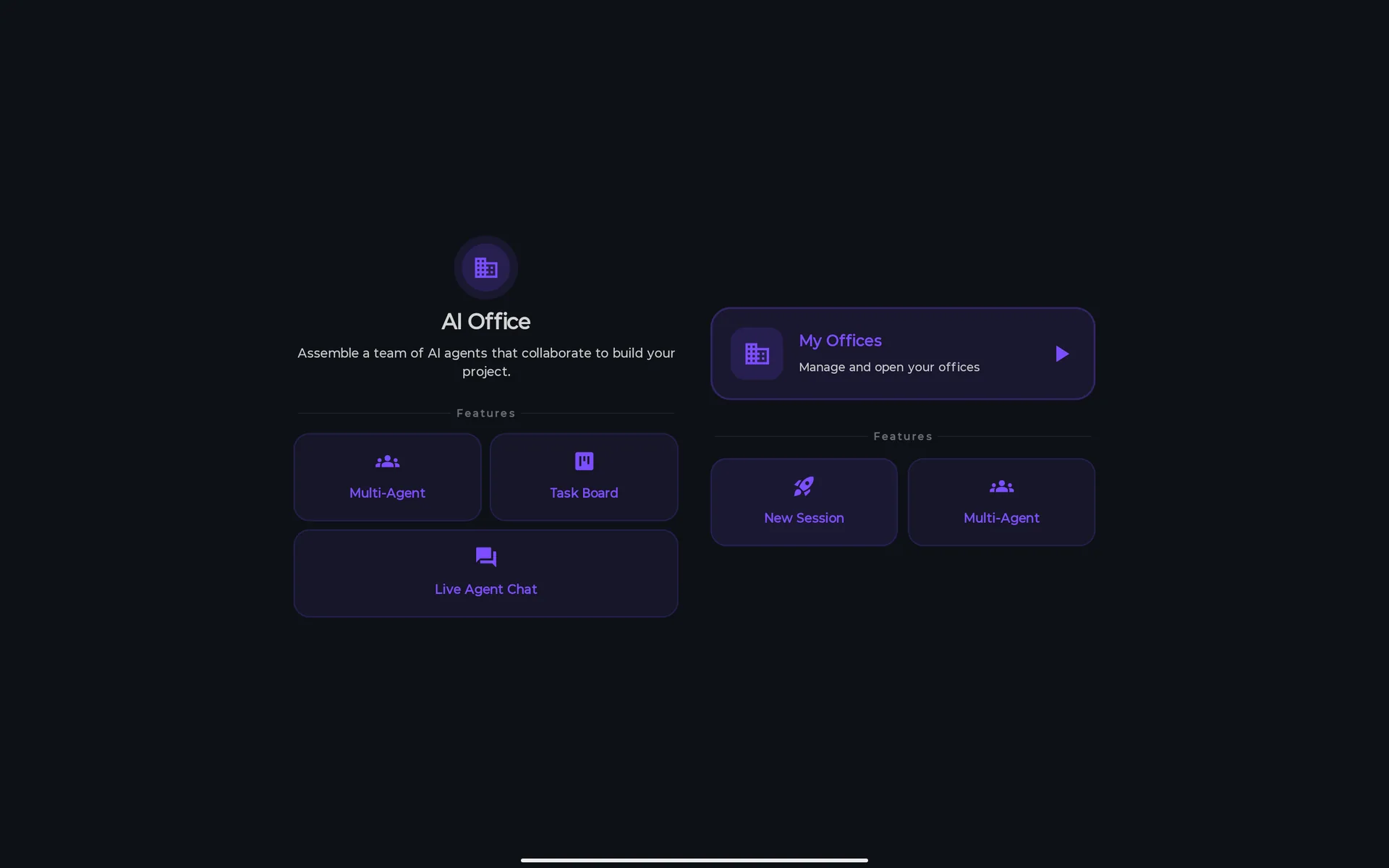
Welcome
Two actions and three information tiles under Features. In landscape the information tiles sit on the left and the actions on the right; in portrait everything is stacked in one column.
You can
- Tap My Offices (Manage and open your offices) to see your offices.
- Tap New Session to go to the Lobby.
You can't, and why
- Tap Multi-Agent, Task Board or Live Agent Chat: they are information tiles, not buttons.By design
My Offices
The offices are the sessions you started: the current one and the past ones. Three counters on top: Total, Running (offices executing now) and Done (completed). A card shows the name, the state, the first lines of the brief, a bar with the tasks done, and chips with the number of agents, the number of sprints, the date, the estimated tokens (~Xk tok) and Project linked. The state has seven labels; an office waiting for a sprint review and a cancelled one are shown as Setup.
You can
- Tap an office to open it. It goes where its state says: Plan Review for one waiting for approval, Planning for one that is planning, Activity for one that runs, is paused or waits for a sprint review, and Results for the rest (completed, failed, cancelled or in setup).
- Reopen an office that was running when the app closed. It comes back paused, with a chat message saying how many tasks were done, and it never resumes by itself, so it can't spend your tokens without you: tap Resume.
- Delete an office with the trash icon, then Delete in the Delete office? dialog. It removes the session and its tasks; it does not touch the files already written in your project.
- Start a new office with + (New Office) or, when the list is empty (No offices yet), with the New Office button.
You can't, and why
- See more than the 20 most recent offices.By design
The Lobby: brief, team and Config
The Lobby is a two-page wizard. Page 1 is What should we build today?; page 2 is Your team, and the Config sheet opens from it. Back returns from page 2 to page 1.
Page 1: what to build
A big text box, three example chips, a carousel of templates and, if you already have projects, a way to build on one. “Describe it in your words. Your team handles the rest.”
You can
- Write the brief in the text box (“Describe your project in detail — the more detail the better…”). Next stays disabled until it has text.
- Tap an example (📝 A notes app, 🌐 A landing page, 🎮 A simple game). It selects the Web App, Landing Page or Game template and fills the box.
- Pick a template under Choose a template (13, see The 13 templates) and tap it again to clear it. A template fills the brief with a full starter prompt (it never overwrites a brief you wrote yourself), sets the platform, language, framework and code style, selects the suggested team and gives the agents a starter architecture to build on. Blank leaves the brief empty and the team at Project Manager and Frontend Dev.
- Build on an existing project with Build on an existing project, which lists your projects. Linking one makes the team work inside it (Your team will read this project first): the Office detects its stack and applies it to the Config sheet if you haven't changed the language, platform and framework, and gives the planner its path, its stack and up to 60 of its file names.
- If the working folder has an instructions file (
.pocketcode/AGENTS.md,AGENTS.md,.pocketcode/COPILOT_INSTRUCTIONS.mdor.github/copilot-instructions.md, the first one found), its first 4,000 characters go to every agent as project rules. - Press Analyze, next to the linked project, to have the project read in depth (see Analyze), or the X to unlink it. Next goes to page 2.
You can't, and why
- See the template names and descriptions in your language: they are fixed English text.Not yet
Page 2: your team
Your team has the project name, one card per role and the Adjust details button.
You can
- Edit Project Name. It is required to start; if you leave it empty it is filled from the first three words of the brief. Without a linked project, the project is created in a folder with that name.
- Turn roles on and off under Select Your Team. The Project Manager can't be turned off. Each selected role shows the model it will use.
- Open Adjust details. Its line shows up to three of Fast (Quick Mode is on), Review on (QA reviews are on) and the platform.
- Press Start Office. It stays disabled while the name or the brief is empty, and shows Setting up office… while it prepares. Before it spends anything it checks that a new project folder fits your plan; then it goes to Planning, picks the model of each role, creates the session and asks the Project Manager for the plan. If the plan is made you land on Plan Review; if it fails you return to the Lobby with “Planning failed — check the chat log for details”.
- Press Back to return to page 1.
You can't, and why
—
The Config sheet
Adjust details opens a sheet titled Config. It exists only in the Lobby: once you press Start Office you can't change any of it. These are its controls, in order.
| Control | What it does |
|---|---|
| Language | 14 options: Kotlin, Java, Swift, Dart, JavaScript, TypeScript, Python, Go, Rust, C++, C#, PHP, Ruby and HTML/CSS/JS. |
| Platform | The platforms that fit the language. If the one you had no longer fits, it changes to the first valid one. |
| Framework | The frameworks that fit the language and the platform. |
| Code Style | Ten styles: Clean Architecture, MVVM, MVC, MVP, MVI, Hexagonal, Layered, Modular, Monolith and Microservices. |
| Design System | None or one of 14 systems from the Visual Designer's catalog: PocketCode, Material 3 Dark, Tech Utility, Warm Editorial, Material 3 Light, iOS / Apple HIG, Fluent Design (Microsoft), Glassmorphism, Ant Design (Enterprise), Nordic / Scandinavian, Cyberpunk / Neon, Notion / Document, Tailwind SaaS and Retro Terminal. Its tokens and rules become a design contract that every UI agent receives. |
| Workflow playbook | Eight cards: see below. |
| Playbook | Five chips: see below. |
| ⚡ Quick Mode | “Skip questions, auto-approve, no QA review — best for simple projects”. The exact conditions are below. |
| Enable QA reviews | On by default. Each task is reviewed by a QA Engineer. |
| Auto-approve plans | Off by default. It has no effect today (see Limitations). |
| Native tool-calling (experimental) | On by default, although it is labelled experimental. See below. |
| Advanced settings | Collapsed. Adversarial review (experimental), Max sprints (1 to 10, default 5), Max retries per task (0 to 5, default 2), Parallel tasks (1 to 4, default 1) and Best-of-N attempts (1 to 3, default 1). |
| AI Provider & Model | Opens the AI Provider screen. It shows the provider and model you chose, or Auto and Default model. |
What the controls really do
- Quick Mode always skips the clarifying questions, asks the planner for 3 to 5 tasks of 2 to 4 files each and raises Parallel tasks to 2 if it was 1. It auto-approves the plan and skips the QA review only when the project is rated Trivial or Simple; from Moderate up you still review the plan and QA still reviews.
- Enable QA reviews: a review exists only if the team has a QA Engineer. If the review call itself fails, the task is accepted without review and the chat says so. On the last allowed retry, an output of more than 200 characters is approved automatically.
- Native tool-calling: on, the agents use the provider's native tool calls, with the same permission gates as AI Chat and the files jailed to the working folder. Off, they use the older text protocol, with a fixed list of tools per role and risk level and up to 8 tool rounds per task.
- Parallel tasks: the slider goes to 4 but the Office runs at most 3 tasks at a time, and only tasks the plan marks as parallel and that declare their files. The Feature Delivery playbook, SPARC and Auto (which defaults to Feature Delivery) raise the minimum to 2, which switches Best-of-N off.
- Max sprints: the planner is asked for at most the lower of Max sprints and the suggested sprints plus one. The suggestion is 1 for Trivial and Simple, 2 for Moderate, 3 for Complex and 5 for Massive.
- Best-of-N attempts: for each code task it makes N attempts one after another and keeps the one that passes the local check, so it costs about N times the tokens on those tasks. It only works with Parallel tasks at 1 and native tool-calling on, on the first attempt of each task.
- Adversarial review: a panel of N skeptical judges (1 to 5, with a quorum and up to 3 judges at once) reviews each task instead of the single QA Engineer. It needs QA reviews on and a QA Engineer in the team, and it multiplies the calls. Everything on this switch is shown in English.
- Design System, Playbook and Workflow playbook shape the prompts of the agents; they don't add tools or approval steps.
You can't, and why
- Choose SPARC: the Office has this playbook, but the selector shows eight cards and SPARC is not one of them. Auto turns it on only if your brief contains “sparc”, “specification pseudocode” or “pseudocode architecture”.Not yet
- Make Auto-approve plans do anything: nothing in the app reads it. To skip the plan review use Quick Mode, which works only for Trivial and Simple projects.Not yet
- Set a token limit, a time limit, a testing strategy or strict mode for tools: they exist in the Office's settings but no control shows them.Not yet
- Change the Config of an office after pressing Start Office: the sheet only exists in the Lobby.By design
Workflow playbook: how the work is planned
Each card tells the Project Manager how to plan and route the work: it shapes the planning prompt and which agent gets which task. It does not add tools or approval steps of its own.
| Card | What it plans |
|---|---|
| Auto | Picks one from the words of your brief (English and Spanish words such as bug, fix, refactor, rendimiento, security, docs or release), in a fixed order where the first match wins, and falls back to Feature Delivery. |
| Feature Delivery | Plan Feature, Implement Feature, Verify Feature. Raises the minimum of parallel tasks to 2. |
| Bug Fix | Triage Bug, Patch Cause, Regression Test. |
| Refactor | Map Current Structure, Apply Refactor, Guard Behavior. |
| Performance Pass | Measure, Optimize, Verify. |
| Security Review | Audit, Harden, Verify. |
| Documentation | Scope Docs, Write Docs, Review Docs. The Tech Writer writes. |
| Release | Run Checks, Release Notes, Ship. |
Playbook: the quality bar
A playbook is a block of rules added to the prompt of every agent. Names and descriptions are fixed English text.
| Chip | What it tells the agents |
|---|---|
| None | No extra rules. |
| Production-ready | A strict quality bar: error handling, input validation and tests for the happy path and the edge cases; no TODOs, stubs, swallowed exceptions or dead code. |
| MVP / prototype | Build the smallest version that shows the core value end to end, then stop; no over-engineering. |
| Security-first | Treat every input as hostile: validate and sanitize it, parameterize queries, never log secrets; no hard-coded credentials, no disabled TLS, no string-built SQL or HTML. |
| Accessibility-first | Semantic HTML, labels on every input, keyboard navigation, enough contrast and visible focus; no missing alt text. |
AI Provider & Model
AI Provider & Model, at the bottom of the Config sheet, opens the AI Provider screen. It reads: “Choose which AI provider and model the office agents will use. Providers without a configured API key are shown as not available.” Below is what it really controls. Keys and sign-ins are managed in Settings, not here: this screen only shows whether each provider has one.
You can
- Pick Auto (the default), or one of five providers under Or pick a specific provider. Each shows Configured or No API key; tap one to expand it.
- Pick Default model or one model of the provider's list. When the model has reasoning levels, a Reasoning tier appears.
- Press Use this provider to confirm and return to the Lobby.
You can't, and why
- Make the agents use the provider and model you pick here: it only sets the plan, the complexity rating, the Analyze this session post-mortem and the default reasoning level. Each agent keeps the model chosen for its role when you pressed Start Office.Not yet
How each provider connects
| Provider | How you connect it (in Settings) |
|---|---|
| OpenAI | An API key, or signing in with your ChatGPT account, which runs OpenAI's Codex CLI bundled in the app and needs a paid ChatGPT plan. |
| Gemini | An API key from Google AI Studio. |
| Claude | An API key. There is no Claude sign-in. |
| Copilot | Your GitHub account (device flow); it needs a paid Copilot subscription. |
| Custom | Any OpenAI-compatible endpoint (OpenRouter, Ollama, a server of your own): its URL, and a key if the server asks for one. |
What this choice really controls
- The Office's own calls: the plan, the complexity rating and the Analyze this session post-mortem use the provider and model you pick, or, with Auto, the best connected model for each job. If the provider you pick is not usable (No API key), they use the best connected model instead.
- The agents' default reasoning level, when you pick a Reasoning tier.
- It does not change which model each agent uses: that was chosen by role when you pressed Start Office (see The team: eight roles). Analyze doesn't use it either: it uses the fastest connected model.
- Auto is not “Gemini Flash”, as the screen says (“Automatically selects the best available provider (Gemini Flash by default)”). It picks the best connected model by capability, cost and speed, and only falls back to a Gemini model when nothing is connected.
Analyze: reading your project
Analyze is optional. It appears on page 1 of the Lobby next to a linked project. The Office reads the project and writes a summary that every agent then receives as context.
You can
- Watch the Analysing Project screen: Scanning… with a progress line (Initializing researcher agent…, then messages such as “Reading N files…” and “Analysing architecture with AI…”, always in English) and the list WHAT THE RESEARCHER DOES.
- Press Skip analysis (or Back) to return to the Lobby. It doesn't cancel the call that is already running.
You can't, and why
- Run it with no provider connected: it fails (Research failed, or the error's own message) and returns to the Lobby.Needs network
What it does
- It reads the project's manifests and docs (for example
package.json,build.gradle,index.html,requirements.txt,README.md,AGENTS.mdorCLAUDE.md), up to 5 source files from the root and the 12 smallest source files of the whole tree (a root file counts once), each cut to 2,000 characters. - It sends that content to your AI provider (the fastest connected model) and asks for a summary: stack, architecture, modules, patterns, key dependencies and naming conventions. If the reply can't be read as such, the beginning of the raw reply is kept instead.
- When it finishes you return to page 1 of the Lobby, the summary is added to the context of every agent and, if the project name was empty, it is filled with the name of the linked project.
- Even without Analyze, linking a project gives the planner a light summary: its path, its detected stack and up to 60 file names.
Planning and Plan Review
After Start Office the Project Manager plans. The Creating Your Plan screen shows three fixed lines (Assembling agents…, Analyzing requirements…, Creating task breakdown…) that are not a real progress bar, and a Cancel button; Back also cancels and returns to the Lobby.
What the planning does
- 1It picks the workflow playbook (with Auto, from the words of your brief).
- 2It asks the Project Manager's clarifying questions, unless Quick Mode is on.
- 3It rates the complexity from 1 to 5: Trivial, Simple, Moderate, Complex or Massive. If the rating call fails it assumes Moderate.
- 4It asks the model for the plan as sprints and tasks, each with a title, description, role, priority, dependencies, files, skills, acceptance criteria, risk, effort and whether it can run in parallel. The plan is written in your device's language.
- 5It gives each task to the best-fitting agent of your team and, if the team has a QA Engineer, a QA Engineer other than the assignee as its reviewer.
- 6It ends in Plan Review. With Quick Mode on and a project rated Trivial or Simple, it starts working straight away instead. If the plan can't be read, it creates a single catch-all task and says so in the chat.
Quick Questions
Unless Quick Mode is on, the Project Manager first asks 3 to 5 questions, each with 3 or 4 answer options, in your device's language. “Answer these to help the PM build a better plan.”
You can
- Pick an answer for each question and press Continue. It stays disabled until all of them are answered.
- Press Skip to plan without the questions.
You can't, and why
—
Review Plan
The screen shows the complexity (a chip in English: TRIVIAL, SIMPLE, MODERATE, COMPLEX or MASSIVE), the Strategy the Project Manager explains and the Sprints, each with its number of tasks.
You can
- Read each task: a priority bar, the title and the description, and chips for effort (Tiny, Small, Medium, Large, Extra Large), priority, Risk: …, Parallel, up to 4 skills and the number of Acceptance criteria, plus the first three criteria and the reason the task went to that agent.
- Edit a task's title and description (Edit task) or Delete it.
- Add Task with a title and a description (but see the limits below).
- Re-plan with feedback: write what you want changed (Describe what you'd like changed…) and the Project Manager redoes the plan, keeping the tasks already done.
- Approve & Start, or Approve plan in the bottom bar, approves the plan and starts the work. You land on Activity.
You can't, and why
- Change a task's priority, dependencies, agent, sprint or criteria here. Priority can be changed later from the Board (Set high priority, Set low priority).Not yet
- Count on a task you add by hand being executed: Add Task creates it with no agent and no sprint, and the sprint scheduler only runs tasks that belong to a sprint. Ask for it in Re-plan with feedback instead.Not yet
- See the effort, risk, priority and complexity chips in your language: they are always English.Not yet
Approvals and complexity
- Approving the plan is the Office's own confirmation. In projects rated Complex or Massive there is another one between sprints: the office stops in Sprint Review and the bottom bar shows Skip Sprint and Approve.
- Quick Mode skips the plan review only for projects rated Trivial or Simple. Auto-approve plans does nothing.
- From Moderate up, tasks estimated Large or Extra Large are split into smaller subtasks while the office works. Complex and Massive projects hold the code tasks back until the architecture tasks are done.
Activity: the office at work
Once the plan is approved the office works on four screens that you can swipe between or open with the four icons of the bottom bar: Activity, Board, Chat and Results. The header shows the project name, a dot that pulses while the office plans or works, and a line with the sprint, how many agents are working (N working) and the estimated tokens (~N tokens (est.)). The Save icon is on the right (see What it writes in your project). Activity is the home of a running office.
You can
- See the team strip: one avatar per agent, with a ring for its state and an estimate of the tokens it has used.
- Tap an agent to open its sheet: role, state (Idle, Thinking…, Working, Reviewing, Waiting, Done, Error or Offline), Model, Tokens and Current task.
- See the checklist of the current sprint: its name, how many tasks are done and the first four tasks.
- Answer a blocking question. When an agent can't go on without you it stops and a banner says that its role needs your input. Type in Your answer… and send it: the answer is saved as a memory, the task goes back to To Do and the office resumes. While it waits, the office is paused.
- Turn on Lead voice to filter the feed to the narration of the orchestrator and your own messages.
- Read the activity feed, newest at the bottom. Long messages fold (Show more, Show less) and tool commands show as discreet rows that start with 🔧.
You can't, and why
- Reassign the tasks of an agent or add an instruction to one agent from this screen: those quick actions belong to a retired screen. Ask for it in Chat, in plain words.Not yet
The action bar
| When the office is… | The bar shows |
|---|---|
| In plan review | Approve plan |
| In sprint review (Complex and Massive projects, between sprints) | Skip Sprint and Approve |
| Executing | Pause |
| Paused | Resume, plus Retry failed when a task failed or is blocked, or Skip Sprint otherwise |
| Planning, completed, failed or cancelled | No bar |
Pause, resume and what they keep
- Pause stops at once: the call to the AI in progress is dropped and its partial result is lost, and a task in progress goes back to To Do and starts over when you resume. The files already written stay as they are.
- Resume relaunches the plan from where it was. Retry failed puts the failed tasks (with their retries reset) and the blocked ones back to To Do and resumes. Skip Sprint marks the sprint as skipped, blocks its unfinished tasks and moves on to the next one.
- When the work ends: if every task is done the office is Completed; if some are done and others failed or are blocked it stops Paused with a message such as “N/M tasks completed, N failed, N blocked”, so you can retry, re-plan or save what you have; if none succeeded it is Failed.
- A failed task is tried again up to Max retries per task times, waiting 3, 6, 12 and then 24 seconds before each new attempt. When two tasks in a row fail the office pauses by itself (“⚠ N consecutive failures detected. Pausing to reassess the plan…”). It also pauses when an agent asks you a question, and when its project folder is missing and your plan has no room for another project.
Tool approvals are decided in AI Chat
- The Office has no approval dialog of its own for tools. What the agents do with tools goes through the same gates as AI Chat: the tools you denied in AI Tool Permissions (Settings → AI), the check of how risky each terminal command is, the access level of the chat (No tools, Read only, Ask first, Auto-edit, Full access) and the approval of anything that leaves the device, such as a
git push, acurlor anssh. - What needs your OK is parked in a queue and the agent keeps working: it is told that the action was not executed and was queued. The cards appear in AI Chat, and the Activity panel of the chat lists the AI Office under Needs you · N. Approve or deny there: the Office never asks inside its own screens.
- With the default level, Auto-edit, file edits run without asking, but running commands and anything that leaves the device wait for your OK. With Ask first, writing files asks too, also when the Office writes the code blocks of an answer at the end of a task: each file waits in the same queue and isn't written until you approve it. With Read only or No tools, the tools of the agents are refused and the Office does not write files by itself either.
Board
Board lists the tasks in seven sections that fold and unfold, one under the other: they are not drag-and-drop columns. With no plan yet it says No tasks yet.
| Section | What it holds |
|---|---|
| Backlog | Tasks that are not scheduled yet. |
| To Do | Tasks ready to be done. |
| Needs input | Tasks waiting for your answer. Only the engine fills it, when an agent asks you a blocking question. |
| In Progress | Tasks an agent is working on. |
| Review | Tasks being reviewed. |
| Done | Finished tasks. |
| Failed | Failed and blocked tasks together. |
You can
- Filter by sprint with the chips All and one per sprint; the current sprint has a ▶.
- Read each card: priority (CRIT, HIGH, MED or LOW), title, assigned role, up to two skills, risk (when it is not low), Parallel, the number of criteria, why it went to that agent and its error, if any.
- Tap a card for its actions: View result (the output, the error and the review feedback, when there is something to see), Skip this task (it becomes blocked), Set high priority, Set low priority and Retry task (it goes back to To Do and, if the office is paused, resumes it).
You can't, and why
- Drag cards between sections: use the actions of the card.By design
Chat
Chat is the log of the office and your only channel to it. It mixes the messages of the agents, the Orchestrator, the System and You, with the time. What the orchestrator and the system write is always English, whatever the language of the app. While empty it says No messages yet.
You can
- Write to the orchestrator (Message the orchestrator…, Send), also in Plan Review, when paused and in a sprint review.
- Your message is read by a model that picks one of nine actions (below). While the office runs the message waits and is handled when the current task ends; when paused or in plan or sprint review it is handled at once; in other states the orchestrator says it will keep it in mind for the next planning step.
- Flag an AI message with the flag icon on the messages of agents and of the orchestrator (see Privacy and cost).
You can't, and why
- Talk to one agent: there is one channel, and it is with the orchestrator.By design
- Be sure it understands you: a model interprets the message, and when it isn't sure it does nothing.By design
What your messages do
| You ask for… | The Office does |
|---|---|
| A re-plan | Re-plans, with your message as feedback. |
| Skipping a task | Marks the task you name as skipped (blocked). |
| Another priority | Changes the priority of the task you name. |
| A new requirement | Keeps it as a lesson that every future task sees. |
| Another agent for a task | Reassigns the task, if you name both the task and the agent. |
| Pause or resume | Pauses or resumes the office. |
| Anything else | Nothing structural changes: the orchestrator answers “Understood. No structural changes needed.” |
Results
Results is the receipt of the office. It shows task counts, progress and estimated tokens: there is no duration, no success rate and no amount of money. The result of each task is on the Board (View result). From top to bottom:
| Block | What it shows |
|---|---|
| Header | When the office is completed, a celebration card (Office complete, with the tasks shipped by your team); otherwise the project name and its state (Setup, Planning…, Review Plan, Executing, Paused, Re-planning…, Sprint Review, Completed, Failed or Cancelled). |
| Counters | Tasks, Done and Failed, and a Progress bar in %. |
| Live preview | Only for web projects that have an index.html in the working folder. It is a hardened preview: no network, only files from the session folder, a restrictive content policy and HTML up to 8 MiB. |
| Artifacts | The documents the team produced (PRD, system design, task plan, test report and code), the latest version of each. Expanding one shows its first 8,000 characters, and each can be reported. |
| Team insights | Cards written by the background workers (see Background work): Security audit, Test gaps, Documentation and Codebase map. The section appears only if workers ran. |
| Session insights | A post-mortem on demand: Analyze this session asks your provider what went well, what to improve and a better prompt for next time. Regenerate asks again, and it can be reported. |
| Sprints | Each sprint with N/M tasks done and its state (Active, Completed, Planned or Skipped). |
| Agent Performance | Per agent: role, model, tasks done and ~N tokens (est.), ordered by tasks done. |
| Execution details | Collapsed. The last 6 engine traces and the last 4 memories. |
| Cancel Session / Close | At the bottom. See below. |
You can
- Press Analyze this session to get the post-mortem.
- Press Cancel Session, or Close on a completed or cancelled office (it does the same). It asks no confirmation: the session becomes Cancelled, is archived in My Offices and you go back to Welcome. It does not delete the files already written.
You can't, and why
- See an amount of money: the Office shows estimated tokens only, on purpose, so as not to invent a cost.By design
- See the Optimizations and Refactor ideas cards: they exist in Team insights but nothing fills them yet, because the workers save those results under other names.Not yet
What it writes in your project
This is the section that matters most: the Office writes into a real project of yours while it works.
Where it writes
- With a linked project, it works in that project's own folder and modifies its existing files; it is told to extend what exists and not to scaffold a new project.
- Without one, it creates a folder named like the project inside the app's
projects/folder, and that folder becomes one more project in your list. If a folder with that name already exists, the Office works in it. The name comes from the first three words of your brief unless you edit Project Name. - At the start the chat says where it will write: “Working in the linked project: …” or “No project linked — the team will work in a new project: …”.
- The agents can't write outside that folder: paths with
..or absolute paths are dropped, and a symbolic link that points out of the folder is refused.
How the files are written
- While a task runs (native tool-calling, the default) the agents create and edit files and run commands with the tools of the app, jailed to the working folder.
- When a task finishes, the Office also writes the files found in the answer of the agent (code blocks with a
path=, or the first code block into the target files of the task). With Ask first, each file goes through the same approval queue as the tools of the agents: it is parked in AI Chat and is not written until you approve it. With Auto-edit or more it is written without asking; with the access level Read only or No tools this step is skipped and the Office writes nothing by itself. - A QA review reads text. On top of it the Office checks the work locally: the HTML and CSS of the Frontend Dev get a structure check, and a script the agent wrote (Python, JavaScript, Ruby, PHP and some more) is run on your device with the same runners as the Run button of the editor, for 30 seconds at most. A real failure sends the task back for another attempt (first attempt only, with QA reviews on).
- A separate honesty check compares what a report says it ran with the commands that were really executed. A task that boasts of a test run nobody launched is sent back or, with no retries left (or when the agent has no way to run commands), finishes marked Not verified by PocketCode.
What it asks you
- Your approval of the plan, and of each sprint in Complex and Massive projects. It is the only confirmation of the Office itself.
- The data notice of your AI provider, once per provider and account: the same notice and the same record as AI Chat. If you decline, nothing is sent.
- Tool approvals, which are decided in AI Chat (see Activity).
The Save icon
- Save, in the header from Plan Review on, writes a summary and the files of the task results. In a linked project the summary goes to
.pocketcode/office/session-<id>.md, so that it doesn't overwrite yourREADME.md; otherwise it is theREADME.mdof the project. Afterwards the icon turns into a green check and no message is shown. - You don't need it to keep the files: they are already in the project (under Ask first, apart from those still waiting for your approval).
- Save writes the code the agents left in the task results, never their report on top of a file: a block with a
path=goes to that path, the first code block of a task goes into its target files, and a result with no code block is written totasks/<title>.md, so the target files of the task are not touched.
Pause, close and recovery
- Every finished task is saved to the device, so an office survives a restart with its finished work.
- If the app closes while an office runs, open it from My Offices: it comes back paused, with the message “This office was interrupted when the app closed (X/Y tasks done). It's paused — tap Resume to continue.”, and you press Resume.
- After each sprint the Office also stores a checkpoint of the session, but nothing in the app restores from it.
You can't, and why
- See a diff, accept or reject a file, undo what the Office wrote or list the files it touched: the engine keeps a private record of which agent changed what, but no screen shows it.Not yet
- Restore an office from its checkpoints: they are saved after each sprint, but nothing in the app uses them. Recovery works through My Offices and Resume.Not yet
- Make an agent write outside the working folder: the paths are checked against the real location of the folder.By design
The 13 templates
These are the 13 templates of page 1 of the Lobby, Blank included. Choosing one sets the platform, language, framework and code style, selects the suggested team (the Project Manager is always added), fills the brief if it is empty or still holds another template's text, and gives the team a starter architecture to build on. The names and descriptions are fixed English text.
| Template | What it is | Suggested team |
|---|---|---|
| Blank | Start from zero, you describe everything. Web, HTML/CSS/JS, Vanilla. | Project Manager, Frontend Dev |
| Web App | Notes, to-do, tracker, runs on-device. Web, HTML/CSS/JS, Vanilla. | Project Manager, Frontend Dev, Backend Dev, QA Engineer |
| Landing Page | Marketing one-pager with a hero and a call to action. Web, HTML/CSS/JS, Vanilla. | Project Manager, Frontend Dev, QA Engineer |
| Dashboard | Charts and data cards from your data. Web, HTML/CSS/JS, Vanilla. | Project Manager, Frontend Dev, Backend Dev, Data Engineer, QA Engineer |
| Portfolio | Personal one-page site for your work. Web, HTML/CSS/JS, Vanilla. | Project Manager, Frontend Dev |
| Game | 2D browser game on HTML5 Canvas. Web, HTML/CSS/JS, Canvas. | Project Manager, Frontend Dev, Backend Dev, QA Engineer |
| Python Tool | Script or CLI, runs on-device (standard library). CLI, Python, no framework. | Project Manager, Backend Dev, QA Engineer |
| Quiz / Flashcards | Interactive quiz or study cards. Web, HTML/CSS/JS, Vanilla. | Project Manager, Frontend Dev, QA Engineer |
| Android App | Native Android app with Jetpack Compose. Kotlin, Jetpack Compose, Clean Architecture. | Project Manager, Architect, Frontend Dev, Backend Dev, QA Engineer |
| REST API | Backend API with Ktor or Spring. Kotlin, Ktor, Clean Architecture. | Project Manager, Architect, Backend Dev, Data Engineer, QA Engineer |
| Full-Stack | Frontend, backend and database. Kotlin, Compose Multiplatform, Clean Architecture. | Seven roles: Project Manager, Architect, Frontend Dev, Backend Dev, Data Engineer, QA Engineer and DevOps (no Tech Writer) |
| Library / SDK | Reusable library with tests and docs. Kotlin, Kotlin Multiplatform, Clean Architecture. | Project Manager, Architect, Backend Dev, QA Engineer, Tech Writer |
| Android Game | 2D native game (Compose Canvas). Kotlin, Compose Canvas, MVVM. | Project Manager, Architect, Frontend Dev, Backend Dev, QA Engineer |
Background work
After a session the Office can run seven analyses in the background, one after another. They are off by default. They don't touch your files: they save notes in the session, which Results shows.
| Worker | What it does |
|---|---|
| Security audit | Looks in the code that was produced for hard-coded secrets, SQL or command injection, insecure API calls, path traversal and exposed sensitive data. |
| Test gaps | Finds functions, classes and modules without tests, in the tasks that produced code. |
| Documentation | Writes a README-style summary: goal, architecture decisions, files produced and known limitations. |
| Memory consolidation | Merges duplicated memories. It acts only when there are at least 10 mergeable entries, and it never touches the audit findings, the test gaps and the documentation. |
| Codebase map | Maps the files produced with what each one imports and exposes. |
| Optimization suggestions | Performance suggestions. Their card in Results is never filled yet. |
| Refactor suggestions | Structural refactor suggestions. Their card in Results is never filled yet. |
When they run
- You turn them on in Settings → AI → AI Tool Permissions with Let the AI work on its own (“Audits, docs and memory after a session. Only while charging on Wi-Fi, never ahead of you, and capped per day. Off means those calls are not made.”). It is off by default.
- They are queued only for a session with at least one finished task. Before each worker runs, the gate checks again: the phone must be charging, on an unmetered network (Wi-Fi), with battery and storage not low; you must not be using the AI at that moment; no tool approvals can be waiting; at least 24 MB of memory must be free; and today's cap (14 background calls by default) must not be used up. If anything can't be confirmed, it doesn't run.
- They use your provider and your quota, like everything else in the Office.
You can't, and why
- Run background work on mobile data or on battery: it waits for Wi-Fi and a charger.Device
Free and Pro
AI Office is Pro as a whole. Everything inside it is included; the only number inside is the number of projects.
| Feature | Free | Pro |
|---|---|---|
| Open AI Office (the four routes) | No: the Pro paywall appears instead | Yes, the whole module |
| Everything inside: Lobby, templates, Config, Analyze, planning, Plan Review, Activity, Board, Chat, Results, insights and background work | Not available, because the Office doesn't open | Included. The module has no other plan gate: Quick Mode, the workflows, Best-of-N, Adversarial review and the post-mortem are open to anyone who is inside |
| Projects an office can add | 1 project in total. It matters only if your plan ends while an office is open, or when you resume an office whose folder was deleted: the session pauses and a sheet offers the upgrade | Unlimited |
| AI providers and keys | Free for everyone: you bring your own key | The same |
| AI credits | PocketCode sells none: each call uses the quota or the bill of your provider | The same |
Privacy and cost
AI Office sends the content of your project to the AI provider you chose, straight from your device: PocketCode puts no AI service in between. Treat the brief and the files you let the agents read as things your provider will process.
What goes to the provider
- Your brief, your answers to the questions, the plan and the tasks, in the calls that need them.
- The context of each task: the earlier results (each cut to 1,500 characters), the files the agent reads with its tools and what its commands print and, with a linked project, its path, its stack and up to 60 file names.
- The instructions file of the project, if it has one (its first 4,000 characters).
- With Analyze: the manifests and docs of the project plus up to 17 source files, each cut to 2,000 characters.
- Lessons and memories: up to 10 lessons from the session, up to 8 relevant memories per task and up to 12 memories from the last 5 sessions of the same linked project.
- The first time you use each provider, the Office needs your acceptance of its data notice, the same one AI Chat shows. It is asked once per provider and account, and nothing is sent to a provider you haven't accepted.
- The flag icon on AI messages, artifacts and post-mortems opens Report response: you choose a reason (child sexual abuse or exploitation, hate or harassment, violence, sexual content, illegal or harmful instructions, or something else) and Send report sends it to PocketCode.
What stays on your device
- Each office is saved in the private storage of the app after every finished task: the brief, the plan and the tasks with their results, the last 200 chat messages, the memories, the artifacts, the Config and the path of the linked project. Deleting an office from My Offices removes it from the list and from the database.
- The sprint checkpoints are JSON files in the private storage of the app.
What it costs
AI Office spends the quota or the bill of your own provider. PocketCode sells no AI credits and shows no amount of money: the only numbers you see are token counts, always an estimate (~N tokens (est.)).
- You can't set a token or time limit. What bounds the spending: Pause and Cancel Session, Max retries per task, Max sprints, a smaller team, Quick Mode on simple projects and the automatic pause after two failed tasks in a row.
- Every call has a 4-minute timeout. After a failure it is tried once more and then with another connected provider, unless the problem is a missing data notice.
- The estimate shows in the header, in the agent sheet, in the team strip (
~1.2k), in Agent Performance and on the card of each office in My Offices (~Xk tok).
The calls an office makes
| Moment | Calls to your provider |
|---|---|
| Planning | The clarifying questions (unless Quick Mode), the complexity rating and the plan, plus one more plan for every re-plan. |
| Each task | The work of the agent (several calls when it uses tools). On the first attempt only: an implementation brief from the strongest connected model (code tasks in Moderate or bigger projects, with QA reviews on), a self-check against the acceptance criteria and, for the Frontend Dev, a design-polish pass. Then the QA review or, with Adversarial review, the judges. Every 5th finished task adds one call to learn a lesson. |
| Every retry | Repeats that cycle, after waiting 3, 6, 12 and then 24 seconds. |
| Best-of-N | Multiplies the work of the agent on code tasks by N. |
| On demand | Analyze (once) and Analyze this session (each time, Regenerate included). |
| In the background (opt-in) | Seven calls per session archived, and only with Let the AI work on its own on. |
Limitations
The limits you are most likely to meet, each with its reason. The detail is in the section of each screen.
- Use AI Office on Free: the whole module is Pro and the paywall appears instead.Pro
- Use the Office with no AI provider connected: every call goes to your own provider.Needs network
- See a diff, accept or reject a file, or undo what the Office wrote.Not yet
- Restore an office from its checkpoints.Not yet
- Set a token or time limit for a session.Not yet
- Make Auto-approve plans do anything.Not yet
- Make AI Provider & Model set the model of each agent, or choose the model of one role.Not yet
- Choose the SPARC playbook from the selector.Not yet
- Have a task you add by hand in Plan Review executed.Not yet
- See the Optimizations and Refactor ideas cards of Team insights filled.Not yet
- Read the templates, the playbooks, the plan chips and the messages of the orchestrator in your language: they are fixed English text.Not yet
- Get a review of the tasks with no QA Engineer in the team.By design
- Pause without losing the call to the AI in progress: Pause drops it and its partial result.By design
- Change the Config of an office after pressing Start Office.By design
- See more than the 20 most recent offices.By design
- Deploy from inside the Office: it is not connected to the Backend Manager.By design
- Run the background workers on mobile data or on battery.Device
Troubleshooting
The messages the Office shows, in the words it uses. The ones the orchestrator and the system write in the chat are always in English.
Project name and description are required
Both are needed to start. Start Office stays disabled while either is empty, so you will rarely see this message. Write the brief on page 1 and a project name on page 2, then press Start Office.
Planning failed — check the chat log for details
The Office went back to the Lobby because the plan could not be made. The usual causes: the provider has no key or can't be reached (look for No API key in AI Provider & Model), the model sent back an empty plan (the log says “Planning returned empty response from all providers” or “Planning failed: all AI providers returned empty. Please try again.”), or you haven't accepted the data notice of that provider, which AI Chat shows the first time you use one. Fix the cause and press Start Office again.
Session creation failed
The Office could not create the session. When the error has its own message, the app shows that message instead. Go back, check that a provider shows Configured and press Start Office again.
Research failed
Analyze needs a connected provider and a project it can read. When the error has its own message, the app shows that message instead. You return to the Lobby: check that a provider shows Configured in AI Provider & Model, then press Analyze again or start without it.
Failed to save project
Save could not create the project or write a file. Check that the device has free space and try again.
⚠ QA review could not run (…) — accepting “…” without review.
The review call failed (a network or provider error), so the task was accepted without a review. Read its result on the Board (View result) and use Retry task if you want it done again.
⚠ N consecutive failures detected. Pausing to reassess the plan…
Two tasks in a row failed, so the office paused. On the Board, open View result on the failed tasks to read the error, fix the cause (key, quota, network), then use Retry failed and Resume, or ask for a re-plan in Chat.
This office was interrupted when the app closed (X/Y tasks done). It's paused — tap Resume to continue.
The app was closed while the office ran. It never resumes by itself, so that it can't spend your tokens without you. Press Resume.
Paused: this office's project folder no longer exists and your plan has no room for another project. Upgrade or delete a project, then tap Resume.
The folder where the office worked was deleted, and recreating it would add a project beyond what your plan allows. Delete a project you no longer need or upgrade, then press Resume.
Unverified claim in “…”: “…” — nothing was executed. Sending it back.
The report of a task says it ran a command or a test that was never executed, so the Office sent the task back. With no retries left (or when the agent has no way to run commands), the task finishes and its result is marked Not verified by PocketCode: treat that part of the report as unverified.
An agent says an action was queued for your approval
It tried something that leaves the device (for example a git push), a command that needs your OK or, with Ask first, a file to write, and the action was not executed. Open AI Chat: the card is waiting there (its Activity panel lists the AI Office under Needs you · N). Approve or deny it; the agent carries on with the rest of the work in the meantime.
Start Office does nothing
It stays disabled until both the project name and the brief have text, and while the Office is already setting up (Setting up office…).
The office is Paused and I didn't pause it
There are four causes: an agent asked you a question (answer it in Activity), two tasks failed in a row, the work ended with some tasks failed or blocked (use Retry failed), or its project folder is missing and your plan has no room for another project. Closing the app also leaves it paused. Press Resume when you are ready.
I pressed Cancel Session by mistake
It asks no confirmation and there is no way back: a cancelled office can't be resumed (My Offices lists it as Setup). The files already written stay in the project. Start a new office on the same project.
A provider says No API key
That provider has no key. Add one in Settings → AI; meanwhile the Office uses the best connected model for its own calls. With no provider at all, planning fails.