
Visual Designer
FreePro: AI Designer + React/Vue/SvelteFigma-style HTML/CSS visual builder: a 2D canvas with smart snap and guides, auto-layout and real grid, a design system of tokens, styles and reusable components, per-breakpoint responsive editing, states and a runnable prototype, and an export that produces semantic HTML/CSS or framework code (React, Vue, Svelte). Includes a Pro AI Designer flow that turns a natural-language brief into an editable project you review before applying.
2D Canvas
Tap to select then drag to move, resize, snap to grid and to other components, 0.1× – 4× zoom, smart guides with distance labels.
35+ components
Text, headings, buttons, forms, media, tables, lists, accordions, carousels, dialogs and semantic containers — each with its own typed options panel.
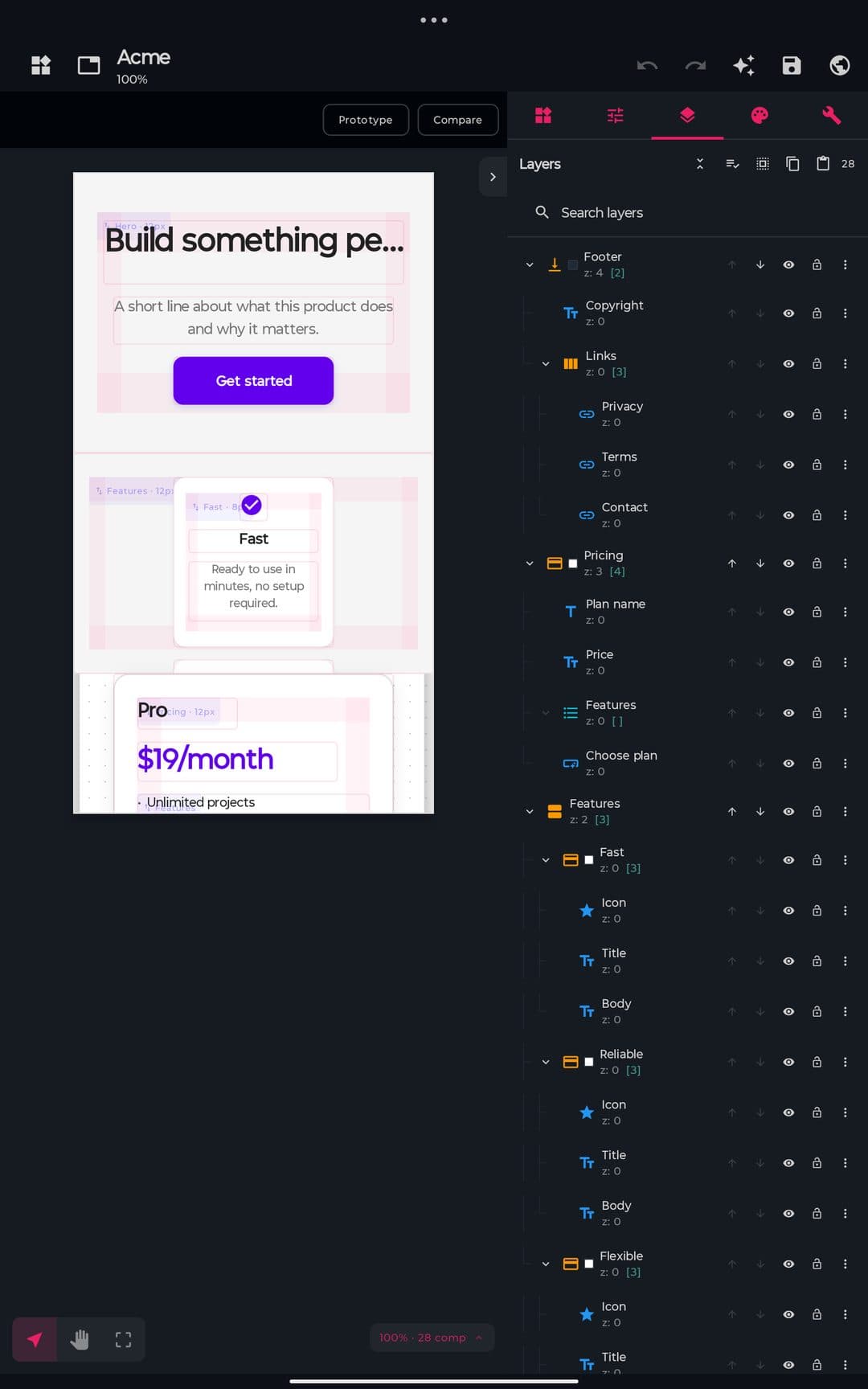
Properties · Layers · Theme
Three side panels to style, order and manage color tokens.
Multi-page
Tabs in preview; add / rename / duplicate / delete with no limit.
5 built-in templates
Landing, Login, Dashboard, Portfolio, E-Commerce + Marketplace — plus ready-made blocks (hero, features, pricing, contact, footer).
Bidirectional Marketplace
Import templates and downloaded components, and export your designs.
Visual canvas
Pure native canvas (no WebView) with dynamic artboard, configurable background, visual grid, smart guides and direct manipulation with two cursor modes: Select and Pan.
| Interaction | Mechanic |
|---|---|
| Tap | Selects the innermost component under the finger; tap on empty space deselects |
| Drag selected | Moves it; smart snap suggests neighbor edges/centers |
| Drag unselected | Pans / scrolls the canvas (does not move the component) |
| Pinch (2 fingers) | Zoom 0.1× – 4×, relative to the cursor |
| Resize | Handles on 4 corners + 4 sides with ghost preview |
| Snap to grid | Configurable grid size (default 16 px); on/off toggle |
| Multi-select | Dragging a selected member moves the whole group |
| Alignment | Left/Center-H/Right · Top/Center-V/Bottom |
| Distribution | Horizontal and vertical |
| Parent-child | Container components accept nested children with flex auto-layout (row/column/grid, gap, padding, wrap) |
| Lock | Locks drag and resize |
| Visibility | Show/hide toggle |
| Rotate | Circular handle on a single selection; snaps every 15° |
| Area tool | Third cursor mode: drag a rectangle to select everything it touches |
| Drag into a container | The target container highlights and an insertion line shows where it will land; drag out to take it out |
| Drag from the palette | Long-press a component and drop it exactly where you want, inside a container if needed |
| Edit text in place | Double-tap any component with text and type over it |
| Context menu | Long-press a selected component: duplicate, copy, delete, order, lock, group, create component… |
| Isolate | Double-tap a container to work only inside it; the rest dims and a breadcrumb shows where you are |
| Rulers and guides | Drag guides out of the rulers; components snap to them. They stay saved with the design |
| Padding and gap by hand | Select a container and drag its spacing bands; values snap to the theme scale |
| Minimap and zoom to selection | Fit to screen, 100%, zoom to what is selected, and a minimap for large designs |
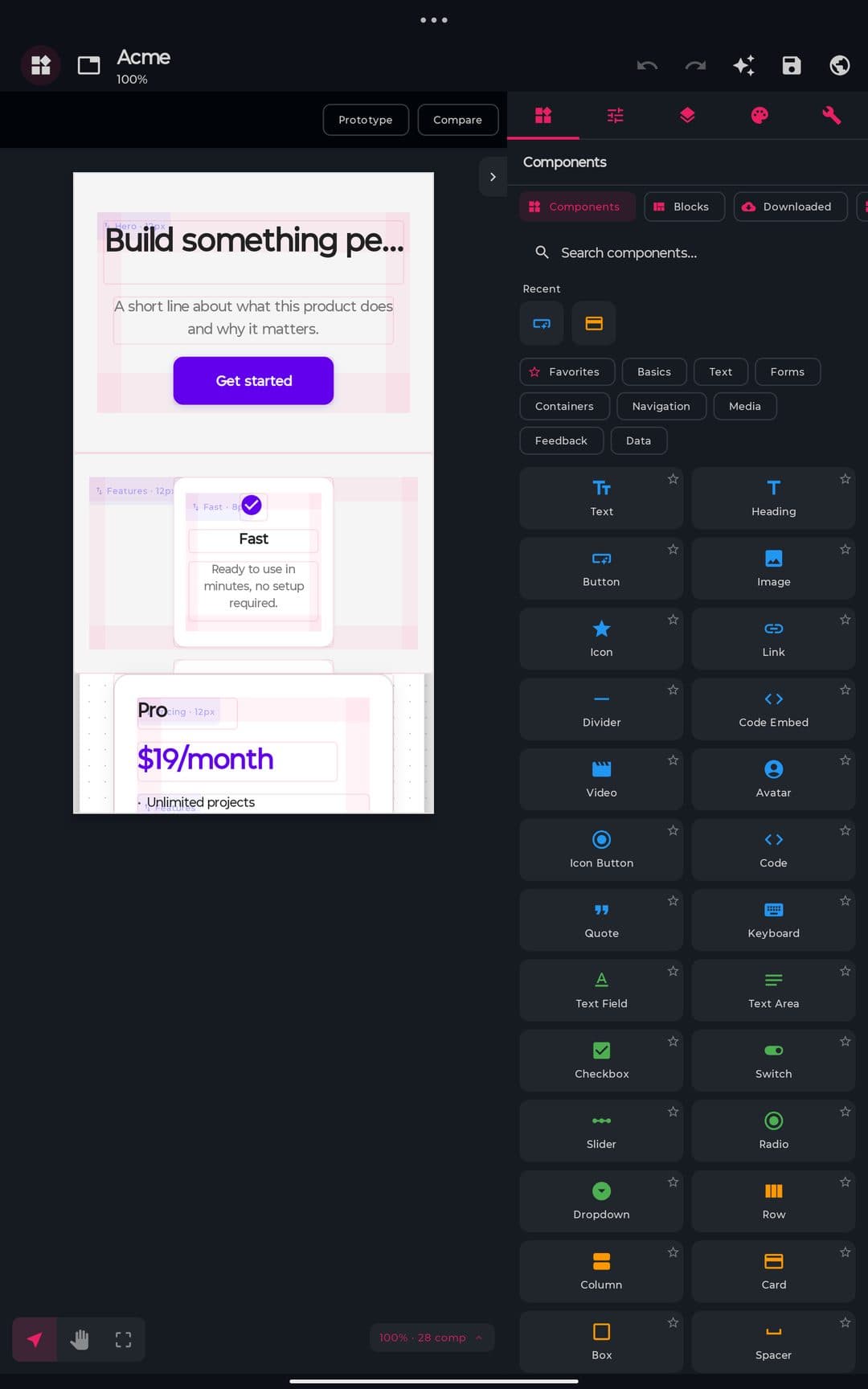
Responsive Preview
Preview the canvas at predefined widths without touching the underlying document.
Original
—
Mobile S
320 px
Mobile
375 px
Mobile L
428 px
Tablet
768 px
Desktop
1280 px
Desktop L+
1440 px+
Pro
Auto-stack reflow
A single pure function shared by the canvas preview and the HTML generator. On narrow widths it clusters roots into rows and either flow-wraps small items (navbars, chips) or stacks blocks full-width — display-only, the document is never mutated.
Per-breakpoint overrides
Each element can store position / size / visibility overrides per breakpoint (mobile ≤ 480 px, tablet ≤ 900 px). Edited from the Responsive tab of the style panel, they win over the auto-stack and export as real @media queries.
Beyond the canvas widths, the full-screen WebView preview renders the generated HTML inside real device frames — Mobile 375 · Tablet 768 · Desktop 1280 · Full — at the device's true CSS width, so the exported @media queries actually fire.
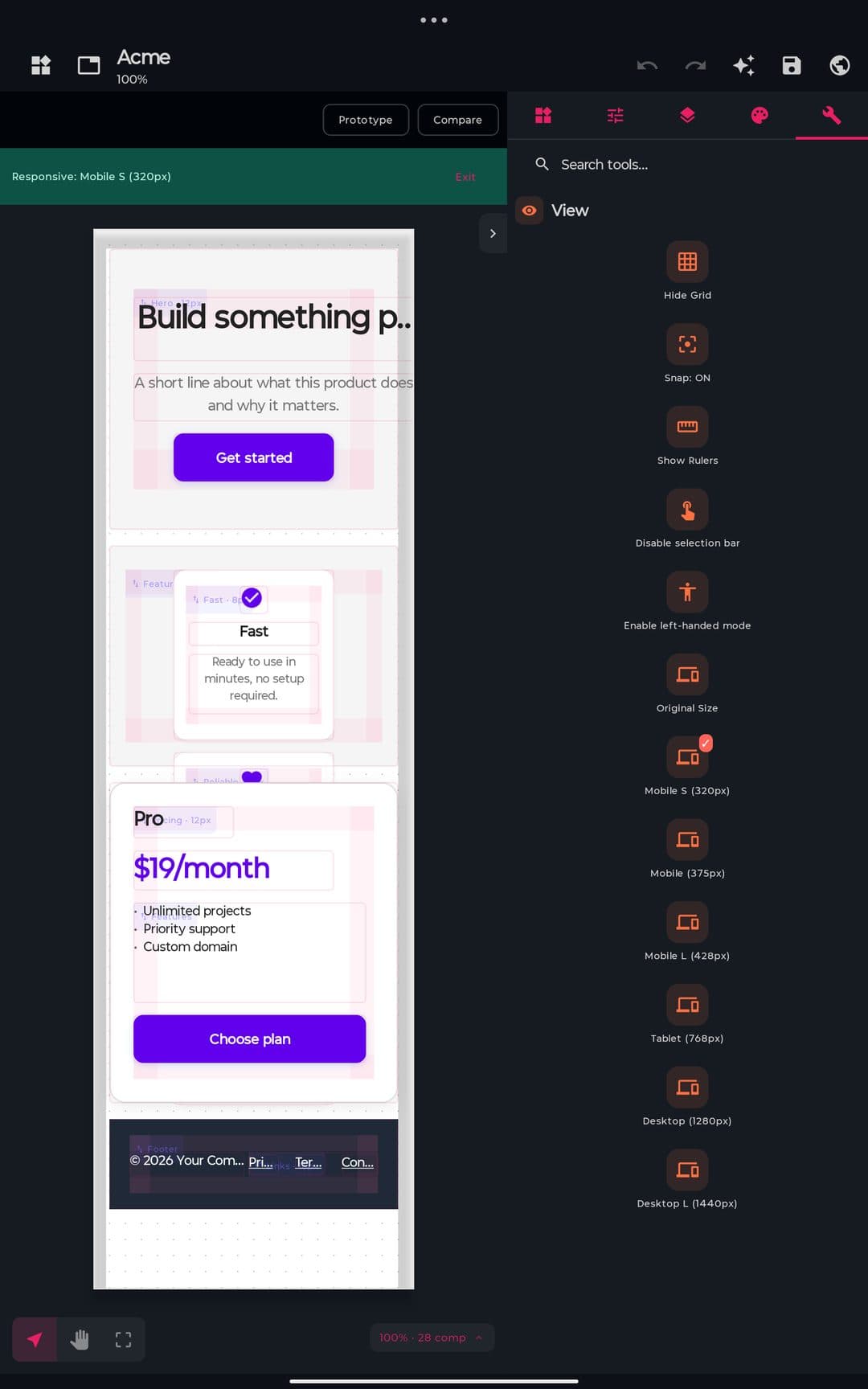
Components palette
Basics
Text · Heading · Button · Link · Icon · Divider · Avatar · Icon Button · Code · Quote
Forms
Text Field · Text Area · Checkbox · Radio · Switch · Select · Slider · Form
Containers
Row · Column · Card · Box · Grid · Section · Header · Footer · Main · Scroll View
Navigation
Navbar · Bottom Nav · Tab Bar · Breadcrumb · Link List
Media
Image · Video · Carousel · Code Embed
Feedback
Dialog · Snackbar · Progress Bar · Spinner · Badge · Chip · Tooltip · Rating
Data
List · Table · Accordion
Blocks
Ready-made sections: hero, features, pricing, contact form, footer
Search, Recents and Favorites across the whole catalog, with a live thumbnail of each component. The Blocks tab inserts ready-made sections, and Downloaded shows components you got from the Marketplace. Icons come from two searchable sets (Material Symbols and Lucide) and are exported as vectors.
Properties panel
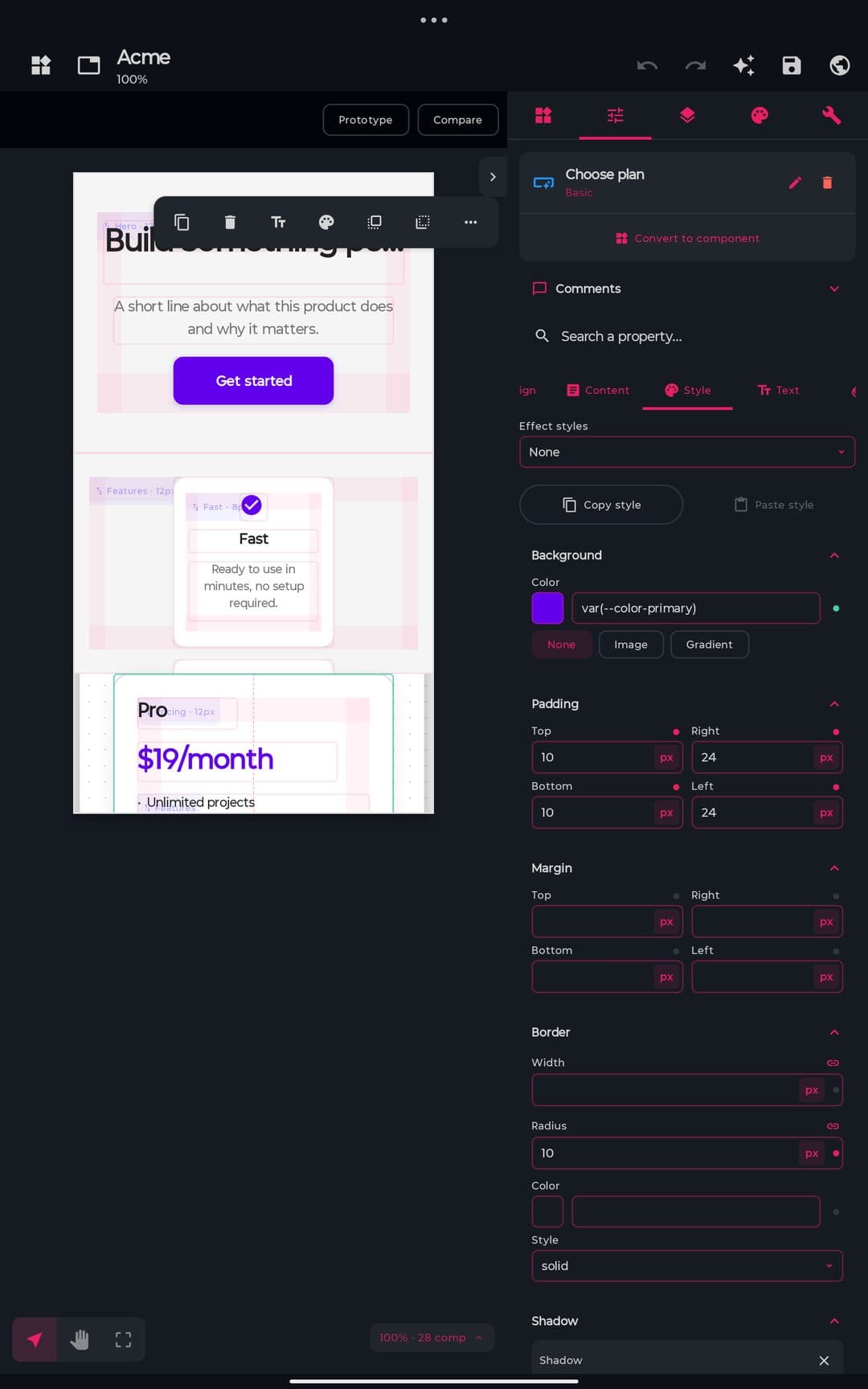
Tabs over the selected component: Design, Layout, Style, Text, Content, Responsive, States and Interactions — plus a property search, so you can type “radius” and jump straight to the control. Select several components at once and every field shows either the shared value or a dash for mixed; editing writes to all of them.
Layout that adapts
Instead of pinning every element to a coordinate, you say how things should behave and the design rearranges itself — the same way the exported page will.
Fixed / Hug / Fill
Set each axis independently: a fixed size, hug the content, or fill the space left over. With optional min and max.
Auto-layout
Containers arrange their children in a row or column with gap, padding, wrap and alignment. Add or remove a child and everything reflows on its own.
Real grid
Define columns and rows as chips (1fr, 200px, auto) and place children across cells with spans. The canvas shows the track lines.
Page in flow
New designs stack their sections like a real web page, so the exported HTML adapts on its own instead of pinning everything to coordinates. Free canvas is still available for pixel-perfect work.
Free-floating children
Take a child out of the flow to pin it wherever you want inside its container — a badge on a card corner, a floating button over a hero.
Design system
Everything that should stay consistent across a project lives in one place, so a change lands everywhere at once.
Tokens
Colors, spacing, type sizes, shadows, radii and opacity as named values you reuse everywhere. Rename one and every component follows; the panel tells you how many use it.
Light and dark theme
Give each token a dark value and switch the canvas over to check it. The export ships both and follows the reader's system setting.
Text and effect styles
Save a whole typography or shadow set under a name and apply it in one tap, like paragraph styles in a design tool.
Reusable components
Turn any selection into a component. Every copy stays linked: edit the original and they all update, while each copy can still override its own text or image.
Health panel
Flags colors outside your palette, spacing off the scale, text with no style and contrast that fails accessibility — before you export.
States, interactions and prototype
A design is not only how it looks at rest: it also reacts. You can define that here and try it out before exporting.
States
Style hover, active, focus and disabled per component, and preview each one on the canvas without leaving the editor.
Interactions
Wire a tap to navigate to another page, open or close a dialog, or switch a component's state. Arrows on the canvas show the flow.
Runnable prototype
Preview mode actually runs it: navigation, dialogs and form validation work, so you can hand someone a link and let them click through.
Animations
Keyframe animations with a Play button, plus entrance and scroll effects and page transitions. They export as real CSS.
History, versions and sharing
Nothing you do is a one-way door: you can look back at it, name a point to come back to, and get the file out.
Readable history
A list of what you actually did (“Move Button 2”, “Change radius of 3 elements”); tap any entry to jump back to that point.
Named versions
Save a checkpoint before a risky change and restore it later. You can also compare two versions side by side and see what moved.
Recovery
Every save keeps a backup copy. If a file ever comes back damaged, the Designer offers the backup or your last checkpoint instead of losing the work.
Share and import
Send a design as a single file, import one back, or bring a design in from Figma. Review comments can be pinned to a component and resolved.
Built-in templates
Landing Page
Modern landing with hero and features grid
Login Form
Email/password authentication form
Dashboard
Admin panel with stats cards and settings
Portfolio
Personal portfolio with about, projects, contact
E-Commerce
Product catalog with detail view
Free limit: 3 designs from templates
From the 4th template-based design onwards the unlimited-templates gate triggers.
Export formats
| Format | Plan | MIME on share |
|---|---|---|
| HTML | Free | text/html |
| CSS | Free | text/css |
| SVG | Free | image/svg+xml |
| React (JSX + CSS) | Pro | text/plain |
| Vue (SFC) | Pro | text/plain |
| Svelte | Pro | text/plain |
| Tailwind | Pro | text/plain |
| ZIP (HTML + CSS + assets) | Free | application/zip |
What you see is what the browser renders
The canvas and the exported page are checked against each other case by case — position and margins, padding and borders, corner radius, colors, gradients, shadows, filters and transforms, typography and line height, wrapping and alignment. Where the two disagreed, the canvas was corrected to match a real browser, so the preview stops flattering the design.
Exported CSS emits real @media queries per component, combining the auto-stack (clean mobile/tablet column) with the user's overrides (which win). All 3 framework formats (React, Vue, Svelte) are gated by Premium and inherit the same @media; Copy HTML, Copy CSS and View Code are always Free.
AI Designer
100 % ProPro-exclusive capability. Turns a natural-language brief into an editable design project, traversing a 5-phase pipeline with mandatory review-first before applying changes to the canvas.
Pipeline
Phase 1
Brief & Discovery
Page type, style, palette, discovery form
Phase 2
Generation
Plan stream + LLM call
Phase 3
Review
Critique scores + actions list
Phase 4
Apply
Actions via undo/redo manager
Phase 5
Live Preview
WebView, Save/Export/Regenerate
20 page types
Landing · Dashboard · Blog · E-commerce · Portfolio · Admin · SaaS · Marketing · Form · Auth · Onboarding · Settings · Pricing · Data Viz · Docs · Social · Gallery · Email · Wireframe · Presentation
10 visual styles
Minimal · Bold · Dark · Editorial · Playful · Corporate · Technical · Glassmorphism · Brutalist · Soft & Warm
8 palettes
Blues · Purples · Greens · Reds · Warm · Mono · Teals · Pinks · + custom 3 colors
Discovery form (optional)
Self-critique scores (0-10)
Hierarchy
Clear visual hierarchy?
Execution
Clean layout?
Specificity
Brief-specific details?
Restraint
Avoids unnecessary complexity?
Color-coded average: green ≥ 7, yellow ≥ 4, red < 4.
Flow guarantees
- •Only safe design actions are accepted (catalog validation)
- •Mandatory visual diff in the AI changes review screen before applying
- •Undo/Redo stays intact — every action goes through the canvas history
- •Exports reuse the manual flow's HTML/CSS generator
AI auxiliary tools (Pro)
- AI Align — takes selected components and reflows them automatically.
- AI Component — generates a section or component from a short brief and inserts it in the canvas.
Built for a phone, complete on a tablet
Floating action bar
Select something and the handful of actions you actually use for that component appear right above it.
Keyboard and mouse
With a keyboard attached: arrows nudge, Delete removes, and the usual undo, copy, paste, duplicate, group and zoom shortcuts work.
One-handed use
Panels remember the height you left them at, the canvas scrolls so the selection stays visible above the keyboard, and there is a left-handed mode.
Accessible
The canvas works with a screen reader, including moving and resizing by steps, and touch targets meet the recommended minimum size.
Free vs Pro plan
| Feature | Plan |
|---|---|
| Canvas editor (all built-in components) | Free |
| Snap, grid, rulers, alignment, distribution | Free |
| Multi-page | Free |
| Color tokens, themes, custom CSS | Free |
| Undo/Redo, auto-save | Free |
| Built-in templates (up to 3 designs) | Free |
| Templates from 4th design onwards | Pro |
| Responsive preview (up to Desktop 1280) | Free |
| Responsive Desktop L + custom breakpoints | Pro |
| Export HTML / CSS / SVG | Free |
| Export React / Vue / Svelte | Pro |
| Copy HTML, Copy CSS, View Code | Free |
| Export design / component (HTML/CSS/React/Vue/Svelte) | Free |
| Full AI Designer (Brief → Review → Apply → Live Preview) | Pro |
| AI Align, AI Component | Pro |
| Auto-layout, real grid and page-in-flow | Free |
| Design system: tokens, styles, reusable components | Free |
| Shared library across designs | Pro |
| States, interactions and runnable prototype | Free |
| History panel, named versions and recovery | Free |
| Import from Figma, share as a file | Free |
| Live code inspector and pre-export checker | Free |
| Export as a zip with assets | Free |
| Export Tailwind | Pro |
Designer in numbers
49
Component types
5
Built-in templates
5
Ready-made blocks
176
Built-in icons
50
Web fonts
8
Token types
8
Export formats
8
Property panel tabs
200
Undo steps
0.1×–4×
Canvas zoom
Next
Marketplace